Programming CM-510 with C: reading values from terminal and moving a Dynamixel AX-12
In this post we are going to ask the ID AX-12+ that we want to move and the goal position.
The explanations are in the code as comments, I hope that there are enough comments to understand it, let me know if you can't understand it.
The main loop is that easy:
[sourcecode language="c"]
int main(void)
{
init();
while(true) // we'll repeat this looop forever
{
int id=getId(); // get the ID of the AX-12 that we want to move
int position=getPosition(); // get the goal position
dxl_write_word( id, P_GOAL_POSITION_L, position); // sent the command to the Dynamixel
}
return 0;
}
[/sourcecode]
A brief explanation of printf: printf function is much more powerful than it seems at a first sight, it admits many parameters that allow us to display a large amount of data types and formats. In In the following example %i means that in that position the message will include an integer that will be passed as a parameter after the string "AX12 ID:". The control character "n" means a line break.
Each character in the string is stored in a memory location [A][X][1][2][ ][I][D] strings are a special case of array.
getID and getPosition are also very easy, isn't?
[sourcecode language="c"]
/*
The next functions asks for the ID of the AX-12 to move, checking that the ID is a value between 1 and 18
*/
int getId()
{
/*
We define an array enough large, 256 bytes (characters). Probably it's enough with 4 bytes, but if we type more than the defined size we will get an error*/
char buffer[256];
/*
And we define another integer variable, it's very advisable to asign a value in the definition, in this case we assign the minimun value, 1*/
int ax12Id=1;
// puts is very similar to printf, it shows the string that it receives as parameter
puts ("nnMoving a Dynamixel");
do
{ // starting the loop
puts ("Enter the ID of the AX-12 that you wwant to move, between 1 y 18, ");
ax12Id=readInteger(buffer); // this function will read from what we type in the keyboard
//// exclamation (!) is the NOT logical operator. It will repeat the loop while the value is not valid
}while(!isValid(ax12Id, 1, 18));
// Showing the typed value
printf("AX12 ID: %in", ax12Id);
return ax12Id;
}
// Now we will repeat almost the same code that above, it should be pretty easy to write a reusable function, isn't?
int getPosition()
{
char buffer[256];
int position=0;
do
{
puts ("Enter a value between 0 and 1023 as the goal position");
position=readInteger(buffer);
}while(!isValid(position, 0, 1023));
printf("nPosition: %in", position);
return position;
[/sourcecode]
The functions used to read the text from the Terminal are quite interesting, showing the use of a string. It also shows how to use the .h file (declaration) and the .c (definitions, the content of the functions):
[sourcecode language="c"]
// Body (content) of the functions that read data
/*
Recibimos una variable que tiene reservado espacio en memoria para almacenar
la cadena introducida
*/
void readString(char bufferParameter[])
{
int i=0; // We'll use this variable as index of the buffer where we will store data
do
{
bufferParameter[i]=getchar(); // it store the read character in the i position of bufferParameter
putchar(bufferParameter[i]); // showing it
if (bufferParameter[i]=='b') // if Backspace was pressed
i--; // it goes to the previous position, rewritting the previoulsy typed character
else //
i++; // it will write in the next position
}while(bufferParameter[i-1]!='n'); // while the last values is not INTRO. The symmbol ! represents the logical operator NOT
bufferParameter[i]=0; // A NULL (0, zero) is necessary in the last position of any string
}
/*
It read an string, it's converted to integer and returned
*/
int readInteger(char bufferParameter[])
{
readString(bufferParameter);
return atoi(bufferParameter);
}
[/sourcecode]
You can download the sourcecode here
The language C, also C++, has some very interesting features such as the inclusion of code depending on certain conditions. This lets you use the same code for different processors by simply changing one or more parameters.
As an example, this ZIP contains a project for Dev-CPP with a version of the source files for the PC and the CM-510; simply commenting or uncommenting a line in the file "myCM510.h" (for AVR Studio you should create the appropriate project and include the sources files).
Instead of moving AX-12 it displays the text "dxl_write_word" with the parameters received. We can practice C and perform different tests on the PC without connecting any servo.
Mostrando entradas con la etiqueta Programming CM-5/CM-510. Mostrar todas las entradas
Mostrando entradas con la etiqueta Programming CM-5/CM-510. Mostrar todas las entradas
lunes, 7 de mayo de 2012

martes, 1 de mayo de 2012
Bioloid CM-510 programming tutorial: First steps with C
Bioloid programming workshop: First steps with C
(En español)
This brief post starts the Bioloid programming workshop, using C, C + + and C# languages and different controllers: ATMega (CM-510), PC, SBC.
The first steps in C programming
C language is a simple, powerful and extremely versatile tool used to develop software for industries as diverse as the automobile , medical equipment or for the software industry itself, from Microsoft Office to operating systems like Windows or Linux.
This will be a very practical programming workshop with Robotis Dynamixel servos, so I will include links tutorials anb books that include broader and deeper explanations, like C introduction (pdf). But there are a lot:
C Language Tutorial (html)
How C Programming Works (html)
Several C programming tutorials (html)
One of the simplest programs in C:
[sourcecode language="c"]
// This line that begins with two slashes is a comment
/*
These others, starting with a slash and an asterisk
are a comment too, ending with another asterisk and a slash.
The comments are very useful for explaining what we do and,
especially, why we do so, because after a few months we will not remember the details.
*/
/*
The includes are useful to announce the compiler that we will use
existing functions from other files, such as stdio.h, in this example, to get
the printf function to display information on screen.
(This is not exactly true, but more on that later)
*/
#include
/*
This is one way to start a C program,
Creating the main function as the starting point of every C program:
*/
void main ()
// The body or content of the function starts with the following curly bracket
{
// Guess what does the following function?
printf ("Hello, World");
// And, predictably, the function ends with the closing curly bracket
}
[/sourcecode]
Now we will write the first program for the CM-510
But previously you should install the software needed to program the CM-510. If you install WinAVR in "C:tools WinAVR-20100110" you can download a zip with everything ready to use.
After loading our program in the CM-510, to use RoboPlus Tasks, Motion RoboPlus Robotis and other programs, we will have to restore Robotis firmware.
[sourcecode language="c"]
# Include stdio.h
# Include "myCM510.h"
executeMovement1 void (int ax12Id)
{
dxl_write_word (ax12Id, P_GOAL_POSITION_L, 512);
}
executeMovement2 void (int ax12Id)
{
dxl_write_word (ax12Id, P_GOAL_POSITION_L, 600);
}
int main (void)
{
ax12Id int = 6;
init ();
printf ("\r \n A simple example");
printf ("\r \n Perform movement 1 with the AX-12% i", ax12Id);
executeMovement1 (ax12Id);
printf ("\r \n Pause half a second");
_delay_ms (500); // half-second pause
printf ("\r \n Beep!");
buzzOn (100); // beep
printf ("\r \n Pause for a second");
_delay_ms (1000); // pause for 1 second
printf ("\r \n Perform movement 2 with the AX-12% i", ax12Id);
executeMovement2 (ax12Id);
printf ("\r \n End");
}
[/sourcecode]
The characters "\r \n" are used to jump to the next line in Windows.
If you have installed the necessary software (WinAVR must be installed in "C:tools WinAVR-20100110") and unzip this zip file in the root directory (C: ) you have to be ready to modify, compile, or simply load the executable "hello_world.hex" in the CM-510. You will see something similar to:
[caption id="attachment_584" align="aligncenter" width="300"] 01_Hello_World_CM-510[/caption]
Some explanations
dxl_write_word (ax12Id, P_GOAL_POSITION_L, 600);
This function is included in the Robotis CM-510 libraries allowing us to send commands to a Dynamixel actuator very easily. We only have to indicate the ID of the AX-12 to move (ax12Id), the code of the order that the AX-12 should execute, in this case go to the goal position (P_GOAL_POSITION_L), and the position in which has to be placed between 0 and 1024 (600 in the example).
Highlights:
Decompose the program into different parts
Using the printf function we can send text to the screen that lets us know what is doing the program (printf sends to the serial port, "RoboPlus Terminal" read it and displays it on the screen. We will lear how to read from the serial port when we start programming Bioloid using a PC or SBC)
Can you think of an easy way to avoid having two similar functions such as "void executeMovement1 (int ax12Id)" and "void executeMovement2 (int ax12Id)"?
(En español)
This brief post starts the Bioloid programming workshop, using C, C + + and C# languages and different controllers: ATMega (CM-510), PC, SBC.
The first steps in C programming
C language is a simple, powerful and extremely versatile tool used to develop software for industries as diverse as the automobile , medical equipment or for the software industry itself, from Microsoft Office to operating systems like Windows or Linux.
This will be a very practical programming workshop with Robotis Dynamixel servos, so I will include links tutorials anb books that include broader and deeper explanations, like C introduction (pdf). But there are a lot:
C Language Tutorial (html)
How C Programming Works (html)
Several C programming tutorials (html)
One of the simplest programs in C:
[sourcecode language="c"]
// This line that begins with two slashes is a comment
/*
These others, starting with a slash and an asterisk
are a comment too, ending with another asterisk and a slash.
The comments are very useful for explaining what we do and,
especially, why we do so, because after a few months we will not remember the details.
*/
/*
The includes are useful to announce the compiler that we will use
existing functions from other files, such as stdio.h, in this example, to get
the printf function to display information on screen.
(This is not exactly true, but more on that later)
*/
#include
/*
This is one way to start a C program,
Creating the main function as the starting point of every C program:
*/
void main ()
// The body or content of the function starts with the following curly bracket
{
// Guess what does the following function?
printf ("Hello, World");
// And, predictably, the function ends with the closing curly bracket
}
[/sourcecode]
Now we will write the first program for the CM-510
But previously you should install the software needed to program the CM-510. If you install WinAVR in "C:tools WinAVR-20100110" you can download a zip with everything ready to use.
After loading our program in the CM-510, to use RoboPlus Tasks, Motion RoboPlus Robotis and other programs, we will have to restore Robotis firmware.
[sourcecode language="c"]
# Include stdio.h
# Include "myCM510.h"
executeMovement1 void (int ax12Id)
{
dxl_write_word (ax12Id, P_GOAL_POSITION_L, 512);
}
executeMovement2 void (int ax12Id)
{
dxl_write_word (ax12Id, P_GOAL_POSITION_L, 600);
}
int main (void)
{
ax12Id int = 6;
init ();
printf ("\r \n A simple example");
printf ("\r \n Perform movement 1 with the AX-12% i", ax12Id);
executeMovement1 (ax12Id);
printf ("\r \n Pause half a second");
_delay_ms (500); // half-second pause
printf ("\r \n Beep!");
buzzOn (100); // beep
printf ("\r \n Pause for a second");
_delay_ms (1000); // pause for 1 second
printf ("\r \n Perform movement 2 with the AX-12% i", ax12Id);
executeMovement2 (ax12Id);
printf ("\r \n End");
}
[/sourcecode]
The characters "\r \n" are used to jump to the next line in Windows.
If you have installed the necessary software (WinAVR must be installed in "C:tools WinAVR-20100110") and unzip this zip file in the root directory (C: ) you have to be ready to modify, compile, or simply load the executable "hello_world.hex" in the CM-510. You will see something similar to:
[caption id="attachment_584" align="aligncenter" width="300"]
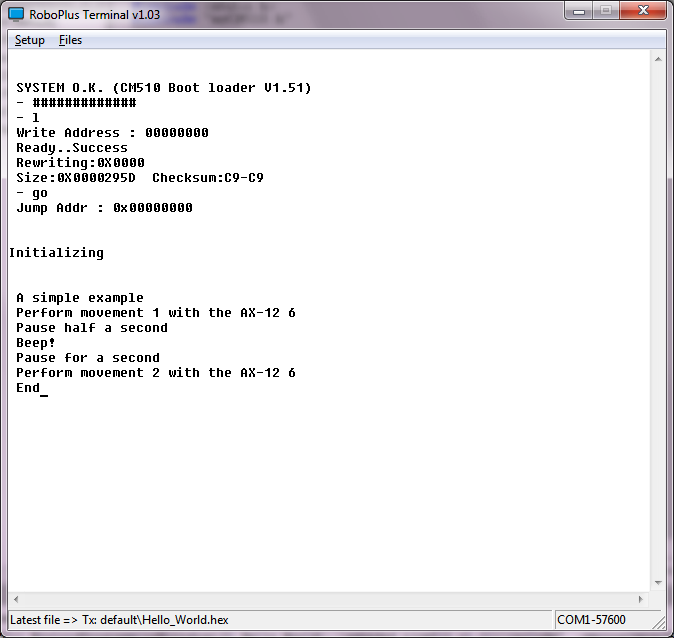 01_Hello_World_CM-510[/caption]
Some explanations
dxl_write_word (ax12Id, P_GOAL_POSITION_L, 600);
This function is included in the Robotis CM-510 libraries allowing us to send commands to a Dynamixel actuator very easily. We only have to indicate the ID of the AX-12 to move (ax12Id), the code of the order that the AX-12 should execute, in this case go to the goal position (P_GOAL_POSITION_L), and the position in which has to be placed between 0 and 1024 (600 in the example).

Highlights:
Decompose the program into different parts
- Having previously created the init () function in myCM510.h/myCM510.c allows us to include it easily in this program.
- In addition to simplifying programming we can reuse the same code in different programs. This saves us from having to repeat the same code many times and, especially, have to correct faults or improve in only one point, . Later we will see how to organize directories and even how to create libraries.
- It also allows us to encapsulate the details, so that when the program starts growing we can handle them easily without being overwhelmed.
Showing what is doing running the program
Using the printf function we can send text to the screen that lets us know what is doing the program (printf sends to the serial port, "RoboPlus Terminal" read it and displays it on the screen. We will lear how to read from the serial port when we start programming Bioloid using a PC or SBC)
Can you think of an easy way to avoid having two similar functions such as "void executeMovement1 (int ax12Id)" and "void executeMovement2 (int ax12Id)"?
martes, 22 de noviembre de 2011
CM-5: Creating a simple "Hello World" C program
This post try to explain how to compile, load in the CM-5 (transmit) and execute a C program (a servo version of the "Hello World" classic example).
(You can find here how to start programming CM-5 / CM-510)
What do you need?
(You can find here how to start programming CM-5 / CM-510)
Obviously, some Bioloid hardware:
- The CM-5
- The battery or power source
- The serial cable
- An AX-12
- A cable to connect the AX-12 with the ID 17 to the CM-5. You can change the ID in the program.
What should you do?
1. Download and install the software:
1.- Download and install the Robotis RoboPlus software.
2.- Download and install WinAVR
3.- Download a Hello World example for WinAVR.
The C “Hello World” servo program is based in the original Robotis example.
4.- You should create a folder for your CM-5 program, for example c:myprojectscm5helloworld Copy there the previously downloaded helloworld.zip and unzip it.
2. Compile and link the program
1. Execute WinAVR and open the unzipped project:
( Bioloid User's Guide.pdf could help you using WinAVR)


You should change the ID 17 of the servo for the ID of the servo you are using

2.- Compile and link. Make all:

3.- You should see “Errors: none”

4.- Transmit and execute the helloworld.hex to the CM-5
( Here you can find more info )

Well, if you only want to test the executable, you can download only the hex.
When loaded you should see an screen with two equal values as a correct "Checksum" check (in this example the value is 81, it's calculated from the source code). If the values are not equal there is an error in the transmission.

5.- Every time you press the red MODE button the servo should spin

Start programming CM-5/CM-510 in C (AVR microcontrollers)
From time to time I receive questions about how to start programming the CM-5/CM-510 with C.
[This post is also in spanish]
I think it’s necessary to have a working knowledge about:
1. C programming
2. CM-5/CM-510 programming
3. Dynamixel protocol
You can find a lot of information about CM-510 / CM-700 programming at Robotis support website And here you can learn how to create a simple "Hello World" program for CM-5
1. C programming
2. CM-5/CM-510 programming
3. Dynamixel protocol
4. Your first step
Two others great sources of information are:
[This post is also in spanish]
I think it’s necessary to have a working knowledge about:
1. C programming
2. CM-5/CM-510 programming
3. Dynamixel protocol
You can find a lot of information about CM-510 / CM-700 programming at Robotis support website And here you can learn how to create a simple "Hello World" program for CM-5
1. C programming
I think “C Programming for Microcontrollers is a fast and very practical introduction to C and microcontrolers programming, but I’m a not sure if it an easy way to start learning C.If you a want a more structured and deeper introduction to the C programming language, this is a pretty good and free introduction:
But there are a lot…
C Language Tutorial (html)
How C Programming Works (html)
Several C programming tutorials (html)
2. CM-5/CM-510 programming
From Robotis support website CM-5/CM-510 programming
3. Dynamixel protocol
From Robotis support website Dynamixel actuator
4. Your first step
If you use a CM-510 you will find here at Robotis support site a lot of information, and if you use the CM-5 you will find in this post some useful information and links
Two others great sources of information are:
Robosavvy Bioloid information wiki
Suscribirse a:
Entradas (Atom)