Mostrando entradas con la etiqueta Robotis. Mostrar todas las entradas

domingo, 17 de marzo de 2013

C++, Bioloid and Raspberry Pi (v0.2)

[V.02 updates: AX C++ architecture, core classes diagram and HexaWheels scanning video]

Why C++, Bioloid and Raspberry Pi?


[caption id="attachment_1254" align="alignleft" width="150"]C++ Stroustrup's book C++ Stroustrup's book[/caption]

C++, specially with the great improvements of the last C++11 standard, joins together a great efficiency in performance and a low memory footprint with advanced high level language features, making C++ a great tool for embedding, robotics, programming.

If you want to know how to use C++ very efficiently these two guides will help you:

- The JSF air vehicle C++ coding standards ( F-35 fighter aircraft)

- ISO C++ committee's report on performance

.

.


[caption id="attachment_1221" align="alignleft" width="300"]Bioloid Premium Bioloid Premium[/caption]

Bioloid Premium is a wonderful kit for creating legged and wheeled robots, including (here full parts list):

- 18 powerful and versatile AX-12 servos

- an ATMega 2561 (CM-510) or, recently, an ARM STM32F103RE 32bits (CM-530), based controller. Also you can control the AX-12 with the USB2Dynamixel straight from your USB with a FTDI driver.

- And a lot of parts to create the structure of the robot

.

[caption id="attachment_1257" align="alignleft" width="216"]RaspberryPi RaspberryPi[/caption]

Raspberry Pi is the cheaper and more brilliant conceived SBC (more specifications here):

- Broadcom BCM2835 SoC full HD multimedia applications processor

- 700 MHz Low Power ARM1176JZ-F Applications Processor

- Dual Core VideoCore IV® Multimedia Co-Processor

- 256/512 MB SDRAM

One simple example:
[youtube http://www.youtube.com/watch?v=Yhv43H5Omfc&w=480&h=360]

Learning C++


Starting:

C++ is a very powerful but complex programming language, so I think that the better approach is to start step by step, from the most easy features (yes, C++ could be used in an easy way) to the most advanced features it offers. What is C++? I will quote (I try to not explain anything that already is explained), Stroustrup, "his father", from his book The C++ programming language 3th Edition:
"C++ is a general-purpose programming language with a bias towards systems programming that
– is a better C,
– supports data abstraction,
– supports object-oriented programming, and
– supports generic programming."

And wikipedia:
C++ (pronounced "see plus plus") is a statically typed, free-form, multi-paradigm, compiled, general-purpose programming language. It is regarded as an intermediate-level language, as it comprises a combination of both high-level and low-level language features.[3] Developed by Bjarne Stroustrup starting in 1979 at Bell Labs, it adds object oriented features, such as classes, and other enhancements to the C programming language.

Web resources:

If you want more C++ links, these found at JUCE will help you.


[caption id="attachment_1385" align="alignright" width="140"]Programming -- Principles and Practice Using C++Programming -- Principles and Practice Using C++ Programming -- Principles and Practice Using C++[/caption]

Free books and documents:


- Maintain stability and compatibility with C++98 and possibly with C;
- Improve C++ to facilitate systems and library design, rather than to introduce new features useful only to specific applications;
- Increase type safety by providing safer alternatives to earlier unsafe techniques;
- Increase performance and the ability to work directly with hardware


Books:

Advancing:

In robotics, and embedded programming in general, we will need some advanced knowledge and practices to reach our goals.

Free books and documents:


  • Concurrent programming, threading Our robots we will need to do several actions simultaneously, like perceiving the world with several sensors, moving and deciding what to do to reach is objectives.


  • Communications, the serial port communications functions are used for wireless and wired connections, and we will need to communicate between controllers and with sensors and servos.


Books:

C++ robotics programming


Well, this is really the goal, robotics programming.

As this is a workshop it will follow the creation of the the walker and vehicle Hexapod showed above in the video. This is currently the core architecture and the HexaWheels module (namespace classes):

[caption id="attachment_1391" align="aligncenter" width="300"]AX C++ architecture v2 AX C++ architecture v2[/caption]

And these are the core classes:

todo_signatura

The workshop will include:

- Basics

Like communications with serial port and wireless, using Dynamixels, sensors, ... Language features for robotics, like asynchronous communications and threads and... delays!.

- Intermediate

Combination of basics features using sensors (like scanning) and servos (walking motions). For example, scanning with a DMS sensor:

As a simple example:

[youtube http://www.youtube.com/watch?v=UHKaYuaZi4A&w=480&h=360]

- Advanced

Advanced perception and behaviours

I think this could very funny, using an advanced sensor like Asus Xtion, to detect certain objects to interact, and create configurable and amusing behaviours.

CM-510 mirocontroller programming

- Tools:

PC, Raspberry Pi and Pandaboard, installation and configuration, tool and projects

- GNU C++, Boost
- Eclipse
- QT 5

The contents will come soon, very soon...

miércoles, 27 de febrero de 2013

Workshop: Dynamixel communications with C#

[Next post: Workshop: USB, serial and remote communications with C#]

As I wrote in the previous post, I am not using Robotis Dynamixel SDK USB2Dynamixelbecause it only works with the  USB2Dynamixel, and I need that it also should work with the serial port and with zigbee or bluetooth (really all 4 use the serial connection). Also I want to query sensors connected to the CM-510.

[caption id="attachment_1053" align="alignright" width="150"]Zigbee device Zigbee[/caption]

Using the CM-510 and computer serial port (or USB to serial) connection you are free to use any wired or wireless device. Really there are a lot of possibilities.

We will start connecting to the Dynamixel bus and sending commands and queries. These classes do the work:

- DynamixelCommunication

- SerialPort2Dynamixel

- RCDataReader

But there are other classes that offer to them some additional services, like Configuration, Utils, Hex and several enumeration types.

I will use the Class-Responsability-Collaboration template to present the classes.

DynamixelCommunicationBioloid DynamixelCommunication class C#


The main responsibility of this class is sending commands and queries to any Dynamixel device, including the sensors, sound and other capabilities of the CM-510 controller.

Collaborator classes:


SerialPort2Dynamixel,  that offers operations to use the serial port encapsulating .Net SerialPort class

- Three enums for easy use and avoid errors, using an specific type is safer that using simple integers.

    public enum AXS1_IRSensor { Left, Center, Right, None };
    public enum AXS1_SoundNote { LA, LA_, SI, DO, DO_, RE }; //Only the first six 
    public enum DynamixelFunction, with all the Dynamixel protocols codes and some that I added for the CM-510.

- Configuration class, that reads a file where are stored basic configuration parameters. like:

        private static string ParameterSerialPortName
        private static string ParameterSerialPortBaudRate
        private static string ParameterWaitTime_ms
        private static string ParameterWaitTimeForSensors_ms

Bioloid communications C#


Operations:


The public operations are the interface that other classes will use, like:

- short readValue(int id, DynamixelFunction address), reads the value of any AX-12 parameter (or other Dynamixels)


- bool sendOrder(int id, DynamixelFunction address, int value), send commands, like position, speed or torque.


And the private that do internal work supporting the public interface, like:

static int getReadWordCommand(byte[] buffer, byte id, DynamixelFunction address), create the Dynamixel hexadecimal sequence (FF FF 0F 05 03 1E CB 01 FE)


- static short getQueryResult(byte[] res), once the query or command is sent it gets the result.


Let's see readValue and two other called functions:

[sourcecode language="csharp"]

public short readValue(int id, DynamixelFunction address)
{
mutex.WaitOne();
short position = -1;

try
{
int size = getReadWordCommand(buffer, (byte)id, address);
byte[] res = serialPort.query(buffer, size, WaitTimeReadSensor);

position = getQueryResult(res);
if (position < 0)
Debug.show("DynamixelCommunication.readValue", position);

}
catch (Exception e)
{
Debug.show("DynamixelCommunication.readValue", e.Message);
}

mutex.ReleaseMutex();

return position;
}

private static int getReadWordCommand(byte[] buffer, byte id, DynamixelFunction address)
{
//OXFF 0XFF ID LENGTH INSTRUCTION PARAMETER1 …PARAMETER N CHECK SUM
int pos = 0;

buffer[pos++] = 0xff;
buffer[pos++] = id;

// bodyLength = 4
buffer[pos++] = 4;

//the instruction, read => 2
buffer[pos++] = 2;

// AX12 register
buffer[pos++] = (byte)address;

//bytes to read
buffer[pos++] = 2;

byte checksum = Utils.checkSumatory(buffer, pos);
buffer[pos++] = checksum;

return pos;
}

private static short getQueryResult(byte[] res)
{
short value = -1;

if (res != null)
{
int length = res.Length;
if (res != null && length > 5 && res[4] == 0)
{
byte l = 0;
byte h = res[5];
if (length > 6)
{
l = res[6];
}

value = Hex.fromHexHLConversionToShort(h, l);
}
}
return value;
}

[/sourcecode]

Notes:


To avoid concurrency problems all the operations that use the Dynamixel bus are protected with a Mutex object that avoids that two or more concurrent objects use DynamixelCommunication simultaneously entering the same operation or using the same resources, like variables, objects or the Dynamixel bus.

All the operations use the same buffer, but being protected with the Mutex object I think that is the better option, although in a previous version I used a very different approach where there were AX12 objects with their own buffer.

[Next post: Workshop: USB, serial and remote communications with C#]

domingo, 24 de febrero de 2013

Workshop: Programming a Bioloid robot workbench using C# and C++

[Next post: Dynamixel communications with C#]

It would be a workshop using C# .Net and C++ with Qt 5. The code presented here is used in this two different robots and boards, a HP 214 Ipaq with Windows Mobile and a Raspberry Pi, using the Robotis CM-510 as the servo and sensors controller:

[youtube http://www.youtube.com/watch?v=mvaMTdlb48E&w=281&h=210][youtube http://www.youtube.com/watch?v=Yhv43H5Omfc&w=281&h=210]

These will be the first steps, using C# and .Net , here the code and the exe for the Workbench UI:

Bioloid Workbench


Using this enhaced Toss Mode that adds some new functions.  Some of them:


lunes, 7 de mayo de 2012

Programming CM-510 with C: reading values from terminal and moving a Dynamixel AX-12

Programming CM-510 with C: reading values from terminal and moving a Dynamixel AX-12

In this post we are going to ask the ID AX-12+ that we want to move and the goal position.

The explanations are in the code as comments, I hope that there are enough comments to understand it, let me know if you can't understand it.

The main loop is that easy:

[sourcecode language="c"]
int main(void)
{
init();

while(true) // we'll repeat this looop forever
{
int id=getId(); // get the ID of the AX-12 that we want to move
int position=getPosition(); // get the goal position
dxl_write_word( id, P_GOAL_POSITION_L, position); // sent the command to the Dynamixel
}

return 0;
}
[/sourcecode]

A brief explanation of printf: printf function is much more powerful than it seems at a first sight, it admits many parameters that allow us to display a large amount of data types and formats. In In the following example %i means that in that position the message will include an integer that will be passed as a parameter after the string "AX12 ID:". The control character "n" means a line break.

Each character in the string is stored in a memory location [A][X][1][2][ ][I][D] strings are a special case of array.

getID and getPosition are also very easy, isn't?

[sourcecode language="c"]
/*
The next functions asks for the ID of the AX-12 to move, checking that the ID is a value between 1 and 18
*/

int getId()
{
/*
We define an array enough large, 256 bytes (characters). Probably it's enough with 4 bytes, but if we type more than the defined size we will get an error*/
char buffer[256];

/*
And we define another integer variable, it's very advisable to asign a value in the definition, in this case we assign the minimun value, 1*/
int ax12Id=1;

// puts is very similar to printf, it shows the string that it receives as parameter
puts ("nnMoving a Dynamixel");

do
{ // starting the loop
puts ("Enter the ID of the AX-12 that you wwant to move, between 1 y 18, ");
ax12Id=readInteger(buffer); // this function will read from what we type in the keyboard
//// exclamation (!) is the NOT logical operator. It will repeat the loop while the value is not valid
}while(!isValid(ax12Id, 1, 18));

// Showing the typed value
printf("AX12 ID: %in", ax12Id);

return ax12Id;
}

// Now we will repeat almost the same code that above, it should be pretty easy to write a reusable function, isn't?

int getPosition()
{
char buffer[256];
int position=0;

do
{
puts ("Enter a value between 0 and 1023 as the goal position");
position=readInteger(buffer);
}while(!isValid(position, 0, 1023));

printf("nPosition: %in", position);

return position;
[/sourcecode]

The functions used to read the text from the Terminal are quite interesting, showing the use of a string. It also shows how to use the .h file (declaration) and the .c (definitions, the content of the functions):

[sourcecode language="c"]
// Body (content) of the functions that read data

/*
Recibimos una variable que tiene reservado espacio en memoria para almacenar
la cadena introducida
*/

void readString(char bufferParameter[])
{
int i=0; // We'll use this variable as index of the buffer where we will store data
do
{
bufferParameter[i]=getchar(); // it store the read character in the i position of bufferParameter
putchar(bufferParameter[i]); // showing it
if (bufferParameter[i]=='b') // if Backspace was pressed
i--; // it goes to the previous position, rewritting the previoulsy typed character
else //
i++; // it will write in the next position
}while(bufferParameter[i-1]!='n'); // while the last values is not INTRO. The symmbol ! represents the logical operator NOT

bufferParameter[i]=0; // A NULL (0, zero) is necessary in the last position of any string
}

/*
It read an string, it's converted to integer and returned
*/
int readInteger(char bufferParameter[])
{
readString(bufferParameter);
return atoi(bufferParameter);
}
[/sourcecode]

You can download the sourcecode here

The language C, also C++, has some very interesting features such as the inclusion of code depending on certain conditions. This lets you use the same code for different processors by simply changing one or more parameters.

As an example, this ZIP contains a project for Dev-CPP with a version of the source files for the PC and the CM-510; simply commenting or uncommenting a line in the file "myCM510.h" (for AVR Studio you should create the appropriate project and include the sources files).

Instead of moving AX-12 it displays the text "dxl_write_word" with the parameters received. We can practice C and perform different tests on the PC without connecting any servo.

martes, 1 de mayo de 2012

Bioloid CM-510 programming tutorial: First steps with C

Bioloid programming workshop: First steps with C

(En español)

This brief post starts the Bioloid programming workshop, using ​C, C + + and C# languages  and different controllers: ATMega (CM-510), PC, SBC.

The first steps in C programming

C language is a simple, powerful and extremely versatile tool used to develop software for industries as diverse as the automobile , medical equipment or for the software industry itself, from Microsoft Office to operating systems like Windows or Linux.

This will be a very practical programming workshop with Robotis Dynamixel servos, so I will include links tutorials anb books that include broader and deeper explanations, like C introduction (pdf). But there are a lot:

C Language Tutorial (html)
How C Programming Works (html)
Several C programming tutorials (html)

One of the simplest programs in C:

[sourcecode language="c"]
// This line that begins with two slashes is a comment

/*
These others, starting with a slash and an asterisk
are a comment too, ending with another asterisk and a slash.

The comments are very useful for explaining what we do and,
especially, why we do so, because after a few months we will not remember the details.
*/

/*
The includes are useful to announce the compiler that we will use
existing functions from other files, such as stdio.h, in this example,  to get
the printf function to display information on screen.
(This is not exactly true, but more on that later)
*/
#include

/*
This is one way to start a C program,
Creating the main function as the starting point of every C program:
*/
void main ()

// The body or content of the function starts with the following curly bracket
{

// Guess what does the following function?
printf ("Hello, World");

// And, predictably, the function ends with the closing curly bracket
}
[/sourcecode]

Now we will write the first program for the CM-510

But previously you should install the software needed to program the CM-510. If you install WinAVR in "C:tools WinAVR-20100110" you can download a zip with everything ready to use.

After loading our program in the CM-510, to use RoboPlus Tasks, Motion RoboPlus Robotis and other programs, we will have to restore Robotis firmware.

[sourcecode language="c"]
# Include stdio.h
# Include "myCM510.h"

executeMovement1 void (int ax12Id)
{
dxl_write_word (ax12Id, P_GOAL_POSITION_L, 512);
}

executeMovement2 void (int ax12Id)
{
dxl_write_word (ax12Id, P_GOAL_POSITION_L, 600);
}

int main (void)
{
ax12Id int = 6;

init ();

printf ("\r \n A simple example");

printf ("\r \n Perform movement 1 with the AX-12% i", ax12Id);
executeMovement1 (ax12Id);

printf ("\r \n Pause half a second");
_delay_ms (500); // half-second pause

printf ("\r \n Beep!");
buzzOn (100); // beep

printf ("\r \n Pause for a second");
_delay_ms (1000); // pause for 1 second

printf ("\r \n Perform movement 2 with the AX-12% i", ax12Id);
executeMovement2 (ax12Id);

printf ("\r \n End");
}
[/sourcecode]

The characters "\r \n" are used to jump to the next line in Windows.

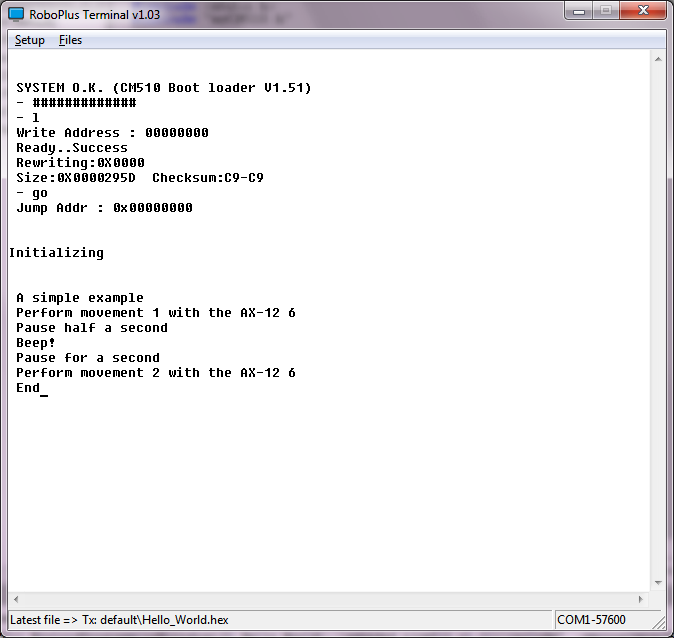
If you have installed the necessary software (WinAVR must be installed in "C:tools WinAVR-20100110") and unzip this zip file in the root directory (C: ) you have to be ready to modify, compile, or simply load the executable "hello_world.hex" in the CM-510. You will see something similar to:

[caption id="attachment_584" align="aligncenter" width="300"]01_Hello_World_CM-510 01_Hello_World_CM-510[/caption]

Some explanations
dxl_write_word (ax12Id, P_GOAL_POSITION_L, 600);

This function is included in the Robotis CM-510 libraries allowing us to send commands to a Dynamixel actuator very easily. We only have to indicate the ID of the AX-12 to move (ax12Id), the code of the order that the AX-12 should execute, in this case go to the goal position (P_GOAL_POSITION_L), and the position in which has to be placed between 0 and 1024 (600 in the example).

dx_series_goal


Highlights:

Decompose the program into different parts

  •     Having previously created the init () function in myCM510.h/myCM510.c allows us to include it easily in this program.

  •     In addition to simplifying programming we can reuse the same code in different programs. This saves us from having to repeat the same code many times and, especially, have to correct faults or improve in only one point, . Later we will see how to organize directories and even how to create libraries.

  •     It also allows us to encapsulate the details, so that when the program starts growing we can handle them easily without being overwhelmed.


Showing what is doing running the program


Using the printf function we can send text to the screen that lets us know what is doing the program (printf sends to the serial port, "RoboPlus Terminal" read it  and displays it on the screen. We will lear how to read from the serial port when we start programming Bioloid using a PC or SBC)

Can you think of an easy way to avoid having two similar functions such as "void executeMovement1 (int ax12Id)" and "void executeMovement2 (int ax12Id)"?

lunes, 5 de marzo de 2012

Linux C++ Dynamixel reading and writing example

If you will like to use some boards like Raspberry or Beagleboard C++ is a great choice. So here you have a working Linux C++ Dynamixel reading and writing example. The main difference is the serial port access:

Here you can download the Eclipse project zipped

Here you can find several combinations of hardware, firmware and programming tools.

The main body


[sourcecode language="cpp"]
#include <iostream>
using namespace std;

#include "SerialPort.h"
#include "Dynamixel.h"

int main() {
cout << "AX Control starts" << endl; // prints AX Control

int error=0;
int idAX12=18;

SerialPort serialPort;
Dynamixel dynamixel;

if (serialPort.connect("//dev//ttyS0")!=0) {
dynamixel.sendTossModeCommand(&serialPort);

int pos=dynamixel.getPosition(&serialPort, idAX12);

if (pos>250 && pos <1023)
dynamixel.setPosition(&serialPort, idAX12, pos-100);
else
printf ("nPosition <%i> under 250 or over 1023n", pos);

serialPort.disconnect();
}
else {
printf ("nCan't open serial port");
error=-1;
}

cout << endl << "AX Control ends" << endl; // prints AX Control
return error;
}
[/sourcecode]

Header


[sourcecode language="cpp"]
#ifndef SERIALPORT_H_
#define SERIALPORT_H_

#include <stdio.h>
#include <termios.h>
#include <fcntl.h>
#include <unistd.h>

class SerialPort {
private:
int fileDescriptor;

public:
int connect ();
int connect (char * device);
void disconnect(void);

int sendArray(unsigned char *buffer, int len);
int getArray (unsigned char *buffer, int len);

int bytesToRead();
void clear();
};

#endif /* SERIALPORT_H_ */
[/sourcecode]

Body:


[sourcecode language="cpp"]
#include <string.h>
#include <sys/ioctl.h>

#include "SerialPort.h"

int SerialPort::connect() {
return connect("//dev//ttyS0");
}

int SerialPort::connect(char *device) {
struct termios terminalAttributes;

/*
* http://linux.die.net/man/2/open
*
* Open the serial port
* read/write
* not become the process's controlling terminal
* When possible, the file is opened in nonblocking mode
*
*/
fileDescriptor = open(device, O_RDWR | O_NOCTTY | O_NDELAY | O_FSYNC );

// clear terminalAttributes data
memset(&terminalAttributes, 0, sizeof(struct termios));

/*    http://linux.die.net/man/3/termios
*
*  control modes: c_cflag flag constants:
*
* 57600 bauds
* 8 bits per word
* Ignore modem control lines.
* Enable receiver.
*/

terminalAttributes.c_cflag = B57600 | CS8 | CLOCAL | CREAD;

/*
* input modes: c_iflag flag constants:
*
* Ignore framing errors and parity errors.
* (XSI) Map NL to CR-NL on output.
*/
terminalAttributes.c_iflag = IGNPAR |  ONLCR;

/*
* output modes: flag constants defined in POSIX.1
*
* Enable implementation-defined output processing.
*/

terminalAttributes.c_oflag = OPOST;

/*
* Canonical and noncanonical mode
*
* min time
* min bytes to read
*/

//terminalAttributes.c_lflag = ICANON;
terminalAttributes.c_cc[VTIME] = 0;
terminalAttributes.c_cc[VMIN] = 1;

/*
* http://linux.die.net/man/3/tcsetattr
* Set the port to our state
*
* the change occurs immediately
*/

tcsetattr(fileDescriptor, TCSANOW, &terminalAttributes);

/*
* http://linux.die.net/man/3/tcflush
*
* flushes data written but not transmitted.
* flushes data received but not read.
*/

tcflush(fileDescriptor, TCOFLUSH);
tcflush(fileDescriptor, TCIFLUSH);

return fileDescriptor;
}

void SerialPort::disconnect(void)
{
close(fileDescriptor);
printf("nPort 1 has been CLOSED and %d is the file descriptionn", fileDescriptor);
}

int SerialPort::sendArray(unsigned char *buffer, int len) {
int n=write(fileDescriptor, buffer, len);
return n;
}

int SerialPort::getArray (unsigned char *buffer, int len)
{
int n1=bytesToRead();
int n=read(fileDescriptor, buffer, len);
return n;
}

void SerialPort::clear()
{
tcflush(fileDescriptor, TCIFLUSH);
tcflush(fileDescriptor, TCOFLUSH);
}

int SerialPort::bytesToRead()
{
int bytes=0;
ioctl(fileDescriptor, FIONREAD, &bytes);

return bytes;
}
[/sourcecode]

martes, 7 de febrero de 2012

Choose hardware, firmware and language

There are a lot of possible combinations of hardware, firmware and languages for programming Bioloid. I think that the table below show the the main combinations.

You can choose from the easy but limited Robotis own tool (Roboplus Task) and only your CM-5 or CM-510 to a SBC or "embedded" PC like Roboard and any language which can manage a serial port connection, like C, C++, Java, Python,...

Linux C++ Dynamixel reading and writing example

C# Dynamixel reading and writing example

Practical C++ programming tutorial for Bioloid

[caption id="attachment_256" align="aligncenter" width="617"]Programming Bioloid: choose hardware, firmware and languages Programming Bioloid: choose hardware, firmware and languages[/caption]

Robotis officially supports the programming solutions with the blue background:

  • The dark blue, RoboPlus Tasks, is the only one in which you can create the motions with RoboPlus Motion and execute it in CM-5/CM-510 with the program create with RoboPlus Tasks, after downloading the generated executable into the CM-5/CM-510, of course.


With these programming solutions you can use the Zigbee SDK to send and receive data between the CM5-/CM-510 and any computer, using Zig-110A or the new bluetooth BT-110, the Zig2Serial and the USB2Dynamixel. You can download example in Visual Basic .Net, C# and Visual C++

But there are more options!

Using a PC, SBC (Single Board Computer), PDA, Mobile or other light and battery powered computer

Using a serial port connection with your more beloved programming language:

  • USB2Dynamixel


If you have any device with a USB host and a FTDI driver you can use USB2Dynamixel to command programatically your Dynamixel servos using the Dynamixel protocol. You only will need your CM-5 or CM-510 to connect your Dynamixel to the battery.

  • Serial port cable


Same as the previous option but instead of using the USB2Dynamixel you only will need the serial cable and the "Toss Mode" launched with the 't' command from the "Manage Mode"


  • Wireless control


Instead of only sending and receiving data, with the previous wireless connections you can command remotely your robot using the standard firmware and the "Toss Mode" launched with the 't' command from the "Manage Mode". You will need to command it using the Dynamixel protocol.

With these options and the CM-510 you will find a little problem... there is no way to read your sensor values! Well, you can use this firmware that offers a "Toss Mode" that supports reading CM-510 ports.

Start learning!

If you want to start learning how to program your CM-5 or CM-510 controller you will find interesting this post "Start programming  CM-5/CM-510 in C". But may be you prefer to control your robot from a PC, SBC or other computer in C++ or C#

sábado, 10 de diciembre de 2011

Writing Dynamixel AX-12+ position

The intent of this code is to be clear and easy to understand, it not pretend to be the best code to do the job.

This method create the command to write the AX-12+ position :

[sourcecode language="cpp"]
int Dynamixel::getSetAX12PositionCommand(byte id, short goal)
{
int pos = 0;
byte numberOfParameters = 0;
//OXFF 0XFF ID LENGTH INSTRUCTION PARAMETER1 …PARAMETER N CHECK SUM

buffer[pos++] = 0xff;
buffer[pos++] = id;

// bodyLength
buffer[pos++] = 0; //place holder

//the instruction, query => 3
buffer[pos++] = 3;

// goal registers 30 and 31
buffer[pos++] = 0x1E;// 30;

//bytes to write
byte hexH = 0;
byte hexL = 0;
toHexHLConversion(goal, &hexH, &hexL);
buffer[pos++] = hexL;
numberOfParameters++;
buffer[pos++] = hexH;
numberOfParameters++;

// bodyLength
buffer[3] = (byte)(numberOfParameters + 3);

byte checksum = checkSumatory(buffer, pos);
buffer[pos++] = checksum;

return pos;
}

int Dynamixel::setPosition(SerialPort *serialPort, int idAX12, int position)
{
int error=0;

int n=getSetAX12PositionCommand(idAX12, position);
long l=serialPort->sendArray(buffer,n);
Sleep(10);

memset(bufferIn,0,BufferSize);
n=serialPort->getArray(bufferIn, 8);

if (n>4 && bufferIn[4] == 0)
printf("nid=<%i> set at pos=<%i>n", idAX12, position);
else {
error=-1;
printf("nid=<%i> error: <%i>n", idAX12, bufferIn[4]);
bf(bufferIn, n);
}

return error;
}

[/sourcecode]

viernes, 9 de diciembre de 2011

Bioloid "Mars Curiosity" (6x6 and rocker-bogie suspension)

This is the first drive of the first version of an 6x6 rocker-bogie suspension inspired in Mars Curiosity rover. It has been built using a Bioloid Comprehensive/Premium kit plus a few parts.

[youtube http://www.youtube.com/watch?v=xGakU0d2PxM&w=640&h=480]

A tougher test:

[youtube http://www.youtube.com/watch?v=kx5Bixb_AWw&w=640&h=480]

miércoles, 23 de noviembre de 2011

Reading Dynamixel AX-12+ position

The intent of this code is to be clear and easy to understand, it not pretend to be the best code to do the job.

This method create the command to read the AX-12+ position :

[sourcecode language="cpp"]
int Dynamixel::getReadAX12PositionCommand(byte id)
{
//OXFF 0XFF ID LENGTH INSTRUCTION PARAMETER1 …PARAMETER N CHECK SUM
int pos = 0;

buffer[pos++] = 0xff;
buffer[pos++] = id;

// length = 4
buffer[pos++] = 4; //placeholder

//the instruction, read => 2
buffer[pos++] = 2;

// pos registers 36 and 37
buffer[pos++] = 36;

//bytes to read
buffer[pos++] = 2;

byte checksum = checkSumatory(buffer, pos);
buffer[pos++] = checksum;

return pos;
}

int Dynamixel::getPosition(SerialPort *serialPort, int idAX12)
{
int ret=0;

int n=getReadAX12PositionCommand(idAX12);
long l=serialPort->sendArray(buffer,n);
Sleep(2);

memset(bufferIn,0,BufferSize);
n=serialPort->getArray(bufferIn, 8);

short pos = -1;
if (n>7)
{
pos = fromHexHLConversion(bufferIn[5], bufferIn[6]);
}

printf("nid=<%i> pos=<%i> length=<%i>n", idAX12, pos, n);
if (pos<0 || pos > 1023)
ret=-2;
else
ret=pos;

return ret;
}
[/sourcecode]

Practical C++ programming tutorial for Bioloid robots

This is the main block of a simple Dynamixel example program using serial port.

Do you want to use the usb2dybnamixel? Changing it will be very easy. Here you can find several combinations of hardware, firmware and programming tools.

Here the Visual Studio C++ zipped project. And if you use this firmware you also can query sensor port values with this example:

martes, 22 de noviembre de 2011

AntOne 3.5 Robotis Bioloid hexapod

AntOne is a project which goal is create interesting and simple behaviours to an hexapod using the Bioloid Premium kit and programmed using C#

Robotis Bioloid

Robotis Bioloid are several modular kits that lets you create "legged" or "wheeled" creatures

Robotis Darwin-OP

Robotis Darwin-OP is the advanced humanoid platform from Robotis

CM-5: Creating a simple "Hello World" C program

This post try to explain how to compile, load in the CM-5 (transmit) and execute a C program (a servo version of the "Hello World" classic example).

What do you need?


(You can find here how to start programming CM-5 / CM-510)

Obviously, some Bioloid hardware:


- The CM-5


- The battery or power source


- The serial cable


- An AX-12


- A cable to connect the AX-12 with the ID 17 to the CM-5. You can change the ID in the program.


What should you do?


1. Download and install the software:


1.- Download and install the Robotis RoboPlus software.


2.- Download and install WinAVR


3.- Download a Hello World example for WinAVR.


The C “Hello World” servo program is based in the original Robotis example.


4.- You should create a folder for your CM-5 program, for example c:myprojectscm5helloworld Copy there the previously downloaded helloworld.zip and unzip it.


2. Compile and link the program


1. Execute WinAVR and open the unzipped project:


( Bioloid User's Guide.pdf could help you using WinAVR)


You should change the ID 17 of the servo for the ID of the servo you are using


2.- Compile and link. Make all:


3.- You should see “Errors: none”


4.- Transmit and execute the helloworld.hex to the CM-5


( Here you can find more info )


Well, if you only want to test the executable, you can download only the hex.


When loaded you should see an screen with two equal values as a correct "Checksum" check (in this example the value is 81, it's calculated from the source code). If the values are not equal there is an error in the transmission.


CM5HexLoaded


5.- Every time you press the red MODE button the servo should spin


CM-510 as a multiple sensor dynamixel item (updated 7/11/13)

[UPDATE 7/11/13: CM_510 TossModeJCA updated to v5.8. Several parameters error fix and somewhat faster]

My main Bioloid project is to build a robot that will have some interesting (non easily predictable but reasonable) behaviours. AntOne 3.6 is the last version:

AntOne 3.6 is based on a PDA that has the software for the behaviour and a CM-510 (ATMega 2561) that control the hardware (servos and sensors). But I discovered that standard CM-510 firmware has no command to get sensor values, so I programmed another with that function. But then I thought that it would be interesting to embed some perception functions in the CM-510.

This is a general diagrama:

[caption id="attachment_47" align="alignnone" width="547"]Single controller Single controller[/caption]

Updated 23/2/2013

The new hex file v4.3 (the old CM-510 firmware)

Now it supports new functions, as:

- Toss Mode (up) now can read from Dynamixel and write to serial and, as the previous version, read from serial and write to Dynamixel, it allows to....
- receive from zigbee and send the data to the Dynamixel button
- read raw sensor values
- averaged sensor values when F_SET_SENSOR_VALUES_TO_FILTER is set < 5, not including the min and the max when >= 5
- CM-510 beep
- sensor scan (still in development)

[sourcecode language="c"]
#define F_NO_FUNCTION 0
#define F_GET_SENSOR_VALUE_RAW 1
#define F_GET_TWO_DMS_SENSOR_VALUES 2
#define F_GET_MULTIPLE_SENSOR_VALUE 3
#define F_GET_SENSOR_VALUE_FILTERED 4
#define F_SET_SENSOR_VALUES_TO_FILTER 5

#define F_BEEP 8
#define F_DO_SENSOR_SCAN 9
#define F_SET_VALUE_DMS1 11
#define F_SET_VALUE_DMS2 12
[/sourcecode]

C# example os use:

[sourcecode language="csharp"]
private void B_ReadPort_Click(object sender, EventArgs e)
{
byte function = (byte)NUD_Function.Value;
byte portId = (byte)NUD_Port.Value;

if (portId < 0 || portId > 6)
portId = 1;

string strPortId=portId.ToString();

if (function == 1 || function == 4)
{
short portValue = cm510.getSensorValue(function, portId);
string str = portValue.ToString();

TB_PortValue.Text = str;
}
else
{
if (function == 2)
{
byte[] parameters = new byte[3];
parameters[0] = function;
parameters[1] = Convert.ToByte(TB_DMS1_ID.Text);
parameters[2] = Convert.ToByte(TB_DMS2_ID.Text);

short[] values = new short[3];
cm510.getMultipleSensorValue(parameters, values);
//cm510.getTwoSensorValue(function, Convert.ToByte(TB_DMS1_ID.Text), Convert.ToByte(TB_DMS2_ID.Text), values);

if (values.Length >= 2)
{
TB_DMS1_PortValue.Text = values[1].ToString();
TB_DMS2_PortValue.Text = values[2].ToString();
}
}
else
{
if (function == 3)
{
byte[] parameters = new byte[3];
parameters[0] = function;
parameters[1] = Convert.ToByte(TB_DMS1_ID.Text);
parameters[2] = Convert.ToByte(TB_DMS2_ID.Text);

short[] values = new short[3];
cm510.getMultipleSensorValue(parameters, values);

if (values.Length >= 2)
{
TB_DMS1_PortValue.Text = values[1].ToString();
TB_DMS2_PortValue.Text = values[2].ToString();
}
}
else
{
if (function == 11)
{
TB_DMS1_ID.Text = strPortId;
}
else
{
if (function == 12)
{
TB_DMS2_ID.Text = strPortId;
}
}
}
}
}
}

[/sourcecode]

Start programming CM-5/CM-510 in C (AVR microcontrollers)

From time to time I receive questions about how to start programming the CM-5/CM-510 with C.

[This post is also in spanish]

I think it’s necessary to have a working knowledge about:

1. C programming

2. CM-5/CM-510 programming

3. Dynamixel protocol

You can find  a lot of information about CM-510 / CM-700  programming at Robotis support website And here you can learn how to create a simple "Hello World" program for CM-5

1. C programming

I think “C Programming for Microcontrollers is a fast and very practical introduction to C and microcontrolers programming, but I’m a not sure if it an easy way to start learning C.If you a want a more structured and deeper introduction to the C programming language, this is a pretty good and free introduction:


C introduction (pdf)


But there are a lot…


C Language Tutorial (html)
How C Programming Works (html)
Several C programming tutorials (html)


and more from Google


2. CM-5/CM-510 programming

From Robotis support website CM-5/CM-510 programming


3. Dynamixel protocol

From Robotis support website Dynamixel actuator


4. Your first step

If you use a CM-510 you will find here at Robotis support site a lot of information, and if you use the CM-5 you will find in this post some useful information and links


Two others great sources of information are:

Robosavvy Bioloid information wiki


Source code of Stuart&Matt library