Mostrando entradas con la etiqueta Software and kits. Mostrar todas las entradas

miércoles, 20 de noviembre de 2013

(I) Reading sensors connected to Robotis CM-510

cm-510 sensorsUsing the Dynamixel SDK instead of RoboPlus Tasks is not possible to query sensors connected to the CM-5xx controller. But, of course, using standard programming languages, like C++, and tools, line QT Creator or Eclipse, with its full featured IDEs and debuggers is a hugue gain.

So I created a firmware for the CM-510 which can be queried and receive commands to itself, including its sensors, or to Dynamyxel devices.

The idea is very simple:

This program running in the CM-510 receives:

- commands or queries to IDs of Dynamixel devices. These are not processed, only redirected to the Dynamixel bus only if it was received by serial port ( serial cable or zigbee). If it was received from the Dynamixel bus nothing is done.

- commands or queries to the CM-510 ID (I chose ID=200), like beep, or to the sensors connected to it. This commands and queries are processed in the CM-510, basically querying the sensors.

In both cases the answer is sent to the connection from which the query or command was received.

After power on the CM-510, you can select the mode with the 4 cursor keys as showed in a terminal connected to its serial port:

"For 'Toss mode' press (Up), for 'Device mode' (Down), for 'Device debug mode' (Left),to start press (Right)"

In the Device mode:

all the receptions and sends are through the Dynamixel bus, the CM-510 is simply another device.

In the Toss mode:

- what is received from the serial connection is sent to the Dynamixel bus or processed in the CM-510 (If sent to its ID)

-what is received from the Dynamixel bus is sent to the serial connection

Finally, the Debug mode:

is like the Device mode, but all the debug messages included in the CM-510 are sent to the serial connection.

A complete sequence with code snippets from the CM-510 program and from the code running in the other computer:

Some C++ code snippets from this example: (C# in the next post)


[sourcecode language="cpp"]
enum AX12Address //and functions implemented in the CM-510 program, like
{
ReadCM510SensorRaw = 1,
Beep = 8,
ReadCM510SensorFiltered = 4,
SetSensorValuesToFilter = 5,
...
}
[/sourcecode]

[sourcecode language="cpp"]
void doBeep()
{
cout << "Beep" << endl;
mySystem.dynamixelCommunication.sendOrder(100, AXS1_Buzzer, (byte) DO, (short) 500);
usleep (200000);
mySystem.dynamixelCommunication.sendOrder(200,MyCommunications::Beep short)5);
}
[/sourcecode]

Querying sensor:

[sourcecode language="cpp"]
void doQuerySensor()
{
int sensorPort=getSensorPort();
int value=mySystem.dynamixelCommunication.readSensorValue (200,ReadCM510SensorRaw, sensorPort);
cout << "the sensor reads: [" << value << "] " << endl << endl << endl;
}
[/sourcecode]

These command and query are processed in the CM-510:

Getting the sensor value:

[sourcecode language="c"]

int executeCM510Function()
{
...
case F_GET_SENSOR_VALUE_RAW:
values[1] = getSensorValueRaw(parameters[1]);
break;

case F_GET_SENSOR_VALUE_FILTERED:
values[1] = getSensorValueFiltered(parameters[1], sensorValuesToFilterDefined);
break;

case F_GET_TWO_DMS_SENSOR_VALUES:
parametersReceived=3;
getTwoDMSSensorsValues();
break;

case F_GET_MULTIPLE_SENSOR_VALUE:
getMultipleSensorsValues();
break;

case F_DO_SENSOR_SCAN:
values[1]= sensorScan(parameters[1]);
break;

case F_SET_VALUE_DMS1 : //set default value DMS1
DMS1=parameters[1];
break;

case F_SET_VALUE_DMS2 : //set default value DMS1
DMS2=parameters[1];
break;

case F_BEEP:
if (debugMode)
printf("executeCM510Function beep\n");
beep();
break;

case F_SET_SENSOR_VALUES_TO_FILTER:
sensorValuesToFilterDefined=parameters[1];
break;
}

return function;
}

}
...
int getSensorValueRaw(unsigned char portId)
{
ADCSRA = (1 << ADEN) | (1 << ADPS2) | (1 << ADPS1);

setPort(portId);
//PORTA &= ~0x80;
//PORTA &= ~0x20;

//_delay_us(12); // Short Delay for rising sensor signal
_delay_us(24);
ADCSRA |= (1 << ADIF); // AD-Conversion Interrupt Flag Clear
ADCSRA |= (1 << ADSC); // AD-Conversion Start

while( !(ADCSRA & (1 << ADIF)) ); // Wait until AD-Conversion complete

PORTA = 0xFC; // IR-LED Off

//printf( "%d\r\n", ADC); // Print Value on USART

//_delay_ms(50);
_delay_ms(ReadSensorDelayMS);

return ADC;
}

[/sourcecode]


[sourcecode language="c"]

void beep()
{
buzzOn(100);
buzzOff();
}
[/sourcecode]

But we can do a little more with the CM-510 processor, we can do some filtering to the sensor values.

The readings from the DMS are usually somewhat erratic, so we can simply:

- discard the minimum and maximum values:

- if we take 5 more than measures, then return the average if the are more than 3, if 3 or less it

Previously we should set how many readings should be done, if not, the default number of readings are 5:

[sourcecode language="c"]
int getSensorValueFiltered(unsigned char portId, int times)
{
...
switch(function)
{
case F_GET_SENSOR_VALUE_RAW:
values[1] = getSensorValueRaw(parameters[1]);
break;

case F_GET_SENSOR_VALUE_FILTERED:
values[1] = getSensorValueFiltered(parameters[1], sensorValuesToFilterDefined);
break;

case F_GET_TWO_DMS_SENSOR_VALUES:
parametersReceived=3;
getTwoDMSSensorsValues();
break;

case F_GET_MULTIPLE_SENSOR_VALUE:
getMultipleSensorsValues();
break;

case F_DO_SENSOR_SCAN:
values[1]= sensorScan(parameters[1]);
break;

case F_SET_VALUE_DMS1 : //set default value DMS1
DMS1=parameters[1];
break;

case F_SET_VALUE_DMS2 : //set default value DMS1
DMS2=parameters[1];
break;

case F_BEEP:
if (debugMode)
printf("executeCM510Function beep\n");
beep();
break;

case F_SET_SENSOR_VALUES_TO_FILTER:
sensorValuesToFilterDefined=parameters[1];
break;
}
...
[/sourcecode]

We also can take values from multiple sensors with one query, but It will be explained in the next post...

lunes, 29 de julio de 2013

(I) Programming serial port communications

250px-Serial_portConnections and operating system symbolic names

A serial port is a communication physical interface through which information  transfers in or out one bit at a time (in contrast to a parallel port) being, more or less compliant, with the RS-232 standard.

But serial port communications aren't only useful for wired DE-9 connectors. it also allows us to use it with USB (ftdi), Bluetooth (serial profile) and Zigbee using virtual serial ports.

·

Types-usbSerial and virtual serial ports appear as  COMx in Windows operating systems (COM1, COM2, ...) andin UNIX/Linux as ttySx or ttyUSBx or even ttyACMx (ttyS0, ttyS1, ttyUSB0, ttyUSB1, ttyACM0, ttyACM1,...).

For programming purposes we usually want to communicate computers with others computers, microcontrollers or other devices like GPS, LED or LCD displays.

·

Serial port programming in C/C++, Windows and Linux

Using the serial port is a lot  easier, but sometimes tricky. The basic commands are to open a connection, read and write over this connection and, finally, tom close it, better if using the C++ RAII idiom.

winWindows commands:
Here you can find a complete C++ for Windows example.

With these next two definitions (among others needed):

HANDLE
serialPortHandle
wchar_t* device

serialPortHandle = CreateFile(device, GENERIC_READ | GENERIC_WRITE, 0, NULL, OPEN_EXISTING, NULL, NULL);


if (serialPortHandle!=INVALID_HANDLE_VALUE)
ReadFile(serialPortHandle, buffer, len, &read_nbr, NULL);

...
if (serialPortHandle!=INVALID_HANDLE_VALUE)
WriteFile(serialPortHandle, buffer, len, &result, NULL);


CloseHandle(serialPortHandle);

linuxUnix/Linux commands:
Here you can find a complete C++ for Linux example.

With these two definitions:
·

int fileDescriptor;

char *device;


·

·


  • Opening a connection, open


struct termios terminalAttributes;

fileDescriptor = open(device, O_RDWR | O_NOCTTY | O_NDELAY | O_FSYNC );

// clear terminalAttributes data
memset(&terminalAttributes, 0, sizeof(struct termios));

terminalAttributes.c_cflag = B57600 | CS8 | CLOCAL | CREAD;
terminalAttributes.c_iflag = IGNPAR |  ONLCR;
terminalAttributes.c_oflag = OPOST;
terminalAttributes.c_cc[VTIME] = 0;
terminalAttributes.c_cc[VMIN] = 1;

tcsetattr(fileDescriptor, TCSANOW, &terminalAttributes);


int n=read(fileDescriptor, buffer, len);

...
int n=write(fileDescriptor, buffer, len);


  • Closing the connection, close


close(fileDescriptor);

More information:


https://en.wikipedia.org/wiki/Serial_communication
http://en.wikipedia.org/wiki/Serial_port

http://www.lvr.com/serport.htm
http://digilander.libero.it/robang/rubrica/serial.htm
http://en.wikibooks.org/wiki/Serial_Programming

http://msdn.microsoft.com/en-us/library/ff802693.aspx

miércoles, 26 de junio de 2013

(II) C++ crash examples tutorial using Robotis CM-900 board and IDE (II)

In this post I will try to show one important C++ feature, virtual classes as interfaces, defining a rol that several classes can implement. Also

Here you can download the file with the source code.

_2_CM900_CPP_Interfaces

[sourcecode language="cpp"]

// C++ crash tutorial with Robotis CM-900.

// First example: http://softwaresouls.com/softwaresouls/

/*
Classes inheritance and interface creation in C++
*/

// Abstract class as Interface for communication device classes http://www.cplusplus.com/doc/tutorial/polymorphism/
class CommunicationDevice
{
public:
virtual void setup(int baudrate=0)=0; // baudrate=0, default parameter in case is not passed any parameter.
//...)=0; is a pure virtual method that convert the class in abstract http://www.cplusplus.com/doc/tutorial/polymorphism/
//      because is not straight usable , a derived classimpllementing the pure virtual methods must be created
virtual void send(char *message)=0;   // default parameter in case is not passed any parameter.

virtual void send(int i)=0; //Method overloading http://www.cplusplus.com/doc/tutorial/functions2/ Same method name with different parameter types

};

class Zigbee : public CommunicationDevice //inherits the interface a should define the methos to be able to create objects.
{
public:
void setup(int baudrate=0);
void send (char *message);
void send(int i);
};

class USB : public CommunicationDevice //inherits the interface a should define the methos to be able to create objects.
{
public:
void setup(int baudrate=0);
void send (char *message);
void send(int i);
};

class Debug {
CommunicationDevice &commDevice;
public:
Debug(CommunicationDevice &aCommDevice) : commDevice(aCommDevice) {}; // member object commDevice is instantiated by reference to avoid object copy
void show(char *message)
{
commDevice.send(message); // the "commDevice"  method called depends on the object passed to the constructor
}

void show(int i)
{
commDevice.send(i);
}
};

void Zigbee::setup(int baudrate)
{
if (baudrate==0)
baudrate=57600; //only changes local copy, not the variable passed as value parameter http://www.cplusplus.com/doc/tutorial/functions2/
Serial2.begin(baudrate);
}

void Zigbee::send(char *message)
{
Serial2.println(message);
}

void Zigbee::send(int i)
{
Serial2.println(i);
}

void USB::setup(int baudrate)
{
SerialUSB.begin();
}

void USB::send(char *message)
{
SerialUSB.println(message);
}

void USB::send(int i)
{
SerialUSB.println(i);
}

Zigbee zigbee;
USB usb;

const byte NumberOfCommsDevices=2;
CommunicationDevice *commsDevices[]={&usb, &zigbee};
//={usb, zigbee};

void setup()
{
//  Individually:

//  zigbee.setup();
//  usb.setup();

//  collectively. using the common Interface "CommunicationDevice"
for (int i=0;i<NumberOfCommsDevices;i++) commsDevices[i]->setup();
delay(2000); // waiting for 2 seconds, let the user activate the monitor/console window (Control+Shift+M).
}

int counter=0;
void loop()
{
++counter;
Debug debug1(usb); // Debug constructor accepts any class inhereting the Interface "CommunicationDevice", Debug(CommunicationDevice &aCommDevice)
debug1.show("Hola"); //debug object will call the method "send" implemented in the object passed to the constructor. In this case "usb.send"

//Showing the counter for each iteration until the 2000th iteration
if (counter <=2000)
debug1.show(counter);
else
{
// Showing the counter every 100 iterations and waiting for 2 seconds
if (counter%100==0) // Operator modulo http://www.cplusplus.com/doc/tutorial/operators/ (returns the remainder)
{
debug1.show(counter);
delay(2000);
}
}
}

[/sourcecode]

martes, 25 de junio de 2013

Bioloid Workbench Windows C++ examples

This post presents the Windows version of two examples/utilities built, this time, with MS Visual C++ and QT Creator, a great open source IDE and framework.

The first utility has a comand line user interface, being an easy example with only two DLL dependencies to the Visual C++ runtimes.

Screenshot-Terminal

The second example utility has a graphic user interface created with QT Creator.

QTWorkbench

Here you can find the bin executables and the projects with the source code.

This is the main function of the first example, the command line:

[sourcecode language="cpp"]
int _tmain(int argc, _TCHAR* argv[])
{
cout << "AXControl_v2_VS_CPP test v0" << endl;

bool quit=false;
MyBasicSystem::BasicSystem mySystem;
UI ui(mySystem);
do
{
ui.showMenu();
int selected=ui.selectOption();
if (selected==ui.OptionQuit)
quit=true;
ui.executeSelectedOption(selected);
}while (!quit);

mySystem.dynamixelCommunication.close();

return 0;
}
[/sourcecode]

[Update] Yesterday I discovered a subtle but ugly bug. Can you spot it? Send an email to if you can't find it but you want to know the danger bug.

It use two classes, the "BasicSystem" (in the library "VS_CPP_AXControl_lib.lib") and a simple "UI" class that receives the input from the user and use the operations offered by the "BasicSystem" class.

For example:

[sourcecode language="cpp"]
int UI::getPosition()
{
int position=0;

do
{
cout << "Type a value between 0 and 1023 to set the AX-12 in that position" << endl; cin>>position;

}while(!validRange(position, 0, 1023));

cout << "Position:" << position << endl;

return position;
}
...
void UI::doSetPosition()
{
int ax12Id=getId();
int position=getPosition();

mySystem.dynamixelCommunication.sendOrder(ax12Id, MyCommunications::GoalPosition,(short) position);
}
[/sourcecode]

And all the cource code:

[sourcecode language="cpp"]
/*------------------------------------------------------------------------------*\
* This source file is subject to the GPLv3 license that is bundled with this *
* package in the file COPYING. *
* It is also available through the world-wide-web at this URL: *
* http://www.gnu.org/licenses/gpl-3.0.txt *
* If you did not receive a copy of the license and are unable to obtain it *
* through the world-wide-web, please send an email to *
* siempre.aprendiendo@gmail.com so we can send you a copy immediately. *
* *
* @category Robotics *
* @copyright Copyright (c) 2011 Jose Cortes (http://www.siempreaprendiendo.es) *
* @license http://www.gnu.org/licenses/gpl-3.0.txt GNU v3 Licence *
* *
\*------------------------------------------------------------------------------*/

#include "stdafx.h"
#include
#include "BasicSystem.h"
#include "Util.h"

using namespace std;

class UI
{
public:
static const int OptionQuit=8;

UI(MyBasicSystem::BasicSystem& aMySystem) : mySystem(aMySystem) {}

void showMenu();
int selectOption();
bool executeSelectedOption(int selected);
void doBeep();

private:
MyBasicSystem::BasicSystem mySystem;

static const int OptionSetLEDOnOff=1;
static const int OptionQueryAX12=2;
static const int OptionMoveAX12=3;
static const int OptionTorqueAX12=4;
static const int OptionQuerySensor=5;
static const int OptionShowMenu=6;
static const int OptionBeep=7;

static const int MinOption=OptionSetLEDOnOff;
static const int MaxOption=OptionQuit;

bool validRange(int value, int MinValue, int MaxValue);
bool nonValidOption(int option);
int getPosition();
int getId();
int getSensorPort();
void doGetPosition();
void doSetPosition();
void doQuerySensor();
void doSetLEDOnOff();
void doSetTorqueOnOff();

};

void UI::showMenu()
{
cout << "V02" << endl;

cout << OptionSetLEDOnOff << ".- Toggle AX-12 LED" << endl;
cout << OptionQueryAX12 << ".- Query AX-12" << endl;
cout << OptionMoveAX12 << ".- Move AX-12" << endl;
cout << OptionTorqueAX12 << ".- Torque AX-12" << endl;
cout << OptionQuerySensor << ".- Query CM-510 sensor" << endl;
cout << OptionShowMenu << ".- Show menu" << endl;
cout << OptionBeep << ".- Beep" << endl;
cout << OptionQuit << ".- Quit" << endl;
}

bool UI::nonValidOption(int option)
{
return (optionMaxOption);
}

int UI::selectOption()
{
int option=-1;

while (nonValidOption(option))
{
cout << "Select option (" << MinOption << "-" << MaxOption << ")" << endl; cin >> option;
if (nonValidOption(option))
{
cout << endl;
cout << endl;
cout << "(" << option << ") is NOT a valid option" << endl; } } return option; } bool UI::validRange(int value, int MinValue, int MaxValue) { return (value>=MinValue && value<=MaxValue);
}

int UI::getPosition()
{
int position=0;

do
{
cout << "Type a value between 0 and 1023 to set the AX-12 in that position" << endl; cin>>position;

}while(!validRange(position, 0, 1023));

cout << "Position:" << position << endl; return position; } int UI::getId() { int ax12Id=1; do { puts ("Type the ID of the AX-12 to use, a value between 1 and 18, "); cin >> ax12Id;

}while(!validRange(ax12Id, 1, 18));

cout << "AX12 Id:" << ax12Id << endl; return ax12Id; } int UI::getSensorPort() { int sensorPort=1; do { puts ("Type the sensor Port to read, a value between 1 and 6, "); cin >> sensorPort;

}while(!validRange(sensorPort, 1, 6));

cout << "Sensor Port number:" << sensorPort << endl;

return sensorPort;
}

void UI::doBeep()
{
cout << "Beep" << endl;
mySystem.dynamixelCommunication.sendOrder(100, AXS1_Buzzer, (byte) DO, (short) 500);
Sleep (2);
mySystem.dynamixelCommunication.sendOrder(200, MyCommunications::Beep, (byte) 5);
}

void UI::doGetPosition()
{
int ax12Id=getId();

int position = mySystem.dynamixelCommunication.readValue(ax12Id, MyCommunications::PresentPosition);
cout << "the position is: [" << position << "] " << endl << endl << endl;
}

void UI::doSetPosition()
{
int ax12Id=getId();
int position=getPosition();

mySystem.dynamixelCommunication.sendOrder(ax12Id, MyCommunications::GoalPosition,(short) position);
}

void UI::doQuerySensor()
{
int sensorPort=getSensorPort();

int value=mySystem.dynamixelCommunication.readSensorValue (200, ReadCM510SensorRaw, sensorPort);
cout << "the sensor reads: [" << value << "] " << endl << endl << endl;
}

void UI::doSetLEDOnOff()
{
byte lByte=0, hByte=0;
int ledValue;

int ax12Id=getId();

ledValue=mySystem.dynamixelCommunication.readValue(ax12Id, MyCommunications::LED);
Hex::toHexHLConversion(ledValue, hByte, lByte);

bool onOff=false;
if (lByte!=0)
onOff=true;

cout << "The LED is: [" << (onOff?"on":"off") << "], putting it: [" << (onOff?"Off":"on") << "] " << endl << endl << endl;
mySystem.dynamixelCommunication.sendOrder(ax12Id, MyCommunications::LED, byte(onOff?0:1));
}

void UI::doSetTorqueOnOff()
{
byte lByte=0, hByte=0;
int ax12Id=getId();

int torque=mySystem.dynamixelCommunication.readValue(ax12Id, MyCommunications::Torque);
Hex::toHexHLConversion(torque, hByte, lByte);
bool onOff=(lByte!=0?true:false);

cout << "The Torque is: [" << (onOff?"on":"off") << "], putting it: [" << (onOff?"Off":"on") << "] " << endl << endl << endl;

mySystem.dynamixelCommunication.sendOrder(ax12Id, MyCommunications::Torque,(byte) (onOff?0:1));
}

bool UI::executeSelectedOption(int option)
{
bool isOk=true;
cout << endl;
cout << endl;

cout << "Selected option: [" << option << "] " << endl; switch(option) { case OptionSetLEDOnOff: doSetLEDOnOff(); break; case OptionQueryAX12: doGetPosition(); break; case OptionMoveAX12: doSetPosition(); break; case OptionTorqueAX12: doSetTorqueOnOff(); break; case OptionQuerySensor: doQuerySensor(); break; case OptionShowMenu: showMenu(); break; case OptionBeep: doBeep(); break; } return isOk; } [/sourcecode]

The code for the Qt version is more complex, but as an example, the same operation that the example for the command line:

[sourcecode language="cpp"] int MainWindow::getAX12_1_Id() { // Get the value from the edit control for the first AX-12 QString qStr=ui->SB_AX12_1_ID->text();
int id=Util::convertToInt(qStr.toStdString());

return id;
}
...
void MainWindow::on_B_AX12_1_SET_POS_clicked()
{
int id = getAX12_1_Id();

// Get the target position from the UI edit control as string and a convert it to int
short position= ui->SB_AX12_1_POS->text().toInt();

// Send the order to the AX-12 with the "id" to go to "position"
pDynComm->sendOrder(id, MyCommunications::GoalPosition,position);
}
[/sourcecode]

domingo, 23 de junio de 2013

(I) Robotis CM-900 C++ crash examples tutorial

This is the first example in a serie of cheap (absolutely free and cheap) articles to get some basic and practical C++ knowledge. It will references the great explanations provided at www.cplusplus.com C++ tutorial. And using the very cheap and opensource (about 20$/€) Robotis 32 bits microcontroller board CM-900 (STM32 based) and Arduino based IDE.

Here you can download the file with the code, and you can find links to a lot of free tutorials, courses and books to learn C++ here.


[sourcecode language="cpp"]
// C++ crash tutorial with Robotis CM-900.

// First example: http://softwaresouls.com/softwaresouls/2013/06/23/c-crash-tutorial-using-robotis-cm-900-board-and-ide-i/

/*
Hello World shows messages on construction and destruction
Also it lets you to salute.
Showing always its assigned identifiction number MyId
*/
class HelloWorld
{
private:
int myId; //Object identification num ber

public:

// class constructor http://www.cplusplus.com/doc/tutorial/classes/
HelloWorld(char *message, byte id)
{
myId=id;
SerialUSB.print(message);
printId();
}

// class destructor http://www.cplusplus.com/doc/tutorial/classes/
~HelloWorld()
{
SerialUSB.print ("Destructing object: ");
printId();
}

void printId()
{
SerialUSB.print(" ID:");
SerialUSB.println(myId);
SerialUSB.println(" ");
}

void Salute(char *name)
{
SerialUSB.print("Hi!, ");
SerialUSB.println(name);
SerialUSB.print("Regards from object: ");
printId();
}
};

/*
void setup() function it's only executed one time at the start of the execution.
It is called from a hidden main() function in the Ronbotis CM-900 IDE core.

\ROBOTIS-v0.9.9\hardware\robotis\cores\robotis\main.cpp
Note: "while (1)" is a forevr loop ( http://www.cplusplus.com/doc/tutorial/control ):

(Basic structure http://www.cplusplus.com/doc/tutorial/program_structure/)

int main(void) {
setup();

while (1) {
loop();
}
return 0;
}
*/
void setup()
{
SerialUSB.begin(); //initialize serial USB connection
delay(3000); //We will wait 3 seconds, let the user open (Control+Shift+M) the Monitor serial console
}

//We will not see neither the construction nor the destruction of this global object because serial port it's not still initiated
HelloWorld hw0("construction object", 0); //Object construction http://www.cplusplus.com/doc/tutorial/classes/

// A counter to see progress and launch events
int iterationCounter=0; //An integer variable to count iterations http://www.cplusplus.com/doc/tutorial/variables

// void loop() will be executing the sentences it contains while CM-900 is on.
void loop()
{
// Lets's show only the first 5 iterations http://www.cplusplus.com/doc/tutorial/control/
if (iterationCounter<5)
{
SerialUSB.print("starting iteration #");
SerialUSB.println(++iterationCounter); // firts, iterationCounter is incremented and then printed

// We will see the consttruction and destruction messages from this local (inside the loop function) object. Object construction http://www.cplusplus.com/doc/tutorial/classes/
HelloWorld hw1("constructing object", 1);
hw1.Salute("Joe");

if (iterationCounter==3)
{
// We will see the consttructiona and destruction messages from this local (inside the "if" block inside the "loop" function) object. Objet construction http://www.cplusplus.com/doc/tutorial/classes/
HelloWorld hw2("constructing object", 2);
hw2.Salute("Jones");
} // Objet hw2 destruction http://www.cplusplus.com/doc/tutorial/classes/

//Let's show that object hw0 is alive
hw0.Salute("Pepe");

SerialUSB.print("ending iteration #");
SerialUSB.println(iterationCounter++); // first cpunter is printed, then incremented.
} // Objet hw1 destruction http://www.cplusplus.com/doc/tutorial/classes/
} // Program end. Objet hw0 destruction http://www.cplusplus.com/doc/tutorial/classes/
[/sourcecode]

domingo, 16 de junio de 2013

Robotis CM-900 in Toss Mode and querying connected sensors

CM-900 is a very cheap and tiny Robotis Dynamixel controller based in the STM32 ARM 32 bits microcontroller. Here you can find several links to documents.

CM-900_Size

I think it's ideal as a controller managed with, for example, a Raspberry Pi or a Pandaboard, so I have created a program which can be managed externally to control Dynamixel items (AX-12, AX-S1), Toss Mode, and sensors connected to the CM-900 with a simple protocol similar but simpler than the Dynamixel protocol:

[Headers] [ID] [Command code] [Nº Params] [Param1] [Param2] [ParamN]

Toss Mode works like USB2Dynamixel, but with this program in addition you can get sensor vales.

Toss Mode was a software feature, at least since CM-5, which allows you to use the elements connected to the controller from another device, usually a more powerful computer. What it receives from the USB or serial is sent to the Dynamixel bus, and whatever it receives from Dynamyxel bus is sent to the serial or USB connection.

Example for blinking twice: { 0xFF, 0xFF, 90, 1, 1, 2 }

Headers: 0xFF 0xFF

ID: 90

Command code: 1

Number of parameters: 1

Parameter 1: 2

Example for reading ultrasonic sensor (HC-SR04) : { 0xFF, 0xFF, 90, 2, 0 }

[sourcecode language="CPP"]

void MainWindow::testCM900_Sensor_US()
{
const int size=5;
byte buffer2[size] = { 0xFF, 0xFF, 90, 2, 0 };
pDynComm->rawWrite(buffer2, size);
}
[/sourcecode]

[caption id="attachment_1753" align="alignleft" width="320"]Ultrasonic sensor hc-sr04 Ultrasonic sensor hc-sr04[/caption]

And here the file with the code for Robotis CM-9 IDE version 0.9.9. You also need to copy Prof. Mason library for ultrasonic sensor to CM 900 IDE libraries folder. Althought it i still a beta version, I think it works ok. Asigning true to these variables, the messages for debugging are sent either to USB connection o Serial2 (connecting Zigbee is the easy option):

[sourcecode language="CPP"]
bool debugOutputSerial2On=true;
bool debugOutputOn=false;
[/sourcecode]

miércoles, 12 de junio de 2013

Robotis CM-900 as a tosser for Dynamixel commands

CM-900 is really tiny and cheap, so is perfect to use as communication bridge between any computer (Raspberry Pi, Pandaboard, etc. included, of course) and the Dynamixel bus. Whatever it receives from the Serial USB (usually commands and queries) is sent to the Dynamixel bus, and what it receives from the Dynamixel bus is sent to the SerialUSB (usually answers)

Here is the source code of the little program for CM-900 IDE:

[sourcecode language="C"]
int counter;
bool onlyOnceHappened;

void blinkOnce()
{
digitalWrite(BOARD_LED_PIN, LOW);
delay_us(100);
digitalWrite(BOARD_LED_PIN, HIGH);
}

void setup()
{
pinMode(BOARD_LED_PIN, OUTPUT);

onlyOnceHappened=false;
counter=0;

//USB Serial initialize
SerialUSB.begin();
// SerialUSB.attachInterrupt(USBDataReceived);
//DXL initialize
Dxl.begin(1);
}

byte aByte=0;
uint8 aUint8;

void loop()
{
// SerialUSB.println (counter++);

if (onlyOnceHappened==false)
{
blinkOnce();
onlyOnceHappened=true;
delay (3000); //Some time to the user to activate the monitor/console
SerialUSB.println ("v1.1.1 Orders receiver started");
}

if (SerialUSB.available())
{
aUint8=SerialUSB.read();
blinkOnce();
Dxl.writeRaw(aUint8);
// delay(20);
}

if (Dxl.available())
{
aByte=Dxl.readRaw();
blinkOnce();
SerialUSB.write(aByte);
// delay(20);
}
}

[/sourcecode]

Here the file.

In the next post I will include an improved version that could read sensors connected to the CM-900, "expanding" the Dynamixel protocol.

martes, 28 de mayo de 2013

[UPDATED] A simple but pretty complete Linux C++ example for Bioloid

[Jun 12, 2013, Some source code typos fixed and code updated]:

.
.
.
.
.

[sourcecode language="cpp"]
bool nonValidOption(int option)
{
return (optionMaxOption);
}
[/sourcecode]

This is a very simple but pretty complete example, trying to use the least possible dependencies. I have tested in a just installed Ubuntu and you only needed the AXControl library (I created and use it because then there were no Robotis library and because it can use serial port, Dynamixel bus, Zigbee, BT (Robotis or other adaptors)

It use the terminal, no QT, to avoid library dependencies. But you should add the AXControl_v2 lib files to your /usr/lib folder as administrator (sudo). Click here if you want one unique executable for Linux (tested with Linux Mint 14) using these sources files

When executed, it shows the values configured in the HexaWheels.conf file and any problem it founds, like SerialPort2Dynamixel.open(ss)=> [Serial port NOT opened]:


ubuntu@A3820 ~/projects/trunk/bioloid/Herramientas/CommandLine $ ./commandline
init to load configuration(ss)=> [./HexaWheels.conf]
Configuration file=> (ss)=> [./HexaWheels.conf]
Tiempo_Espera_ms(ss)=> [35]
Tiempo_Espera_Sensores_ms(ss)=> [60]
Nombre_Puerto_Serie(ss)=> [/dev/ttyUSB0]
Baudios_Puerto_Serie(ss)=> [1000000]
Motion_File_Name(ss)=> [HexaWheels_2.0.mtn]
UmbralContacto(ss)=> [550]
UmbralDeteccion(ss)=> [200]
loadConfigurationValues: (si)=> [134529476]
getIntValue: (ss)=> [Tiempo_Espera_ms]
getIntValue: (ss)=> [Tiempo_Espera_Sensores_ms]
getIntValue: (ss)=> [Baudios_Puerto_Serie]
getStringValue: (ss)=> [Nombre_Puerto_Serie]


Device /dev/ttyUSB0, Speed B1000000
SerialPort2Dynamixel.open(ss)=> [Serial port NOT opened]
SerialPort2Dynamixel.open, serialPortName(ss)=> [/dev/ttyUSB0]
SerialPort2Dynamixel.open, baudRate(si)=> [4104]
I can't open DynamixelCommunication, name: (ss)=> [/dev/ttyUSB0]
terminate called after throwing an instance of 'std::exception*'
Aborted

If it can connect an there are no problem you should see:


ubuntu@A3820 ~/projects/trunk/bioloid/Herramientas/CommandLine $ ./commandline
init to load configuration(ss)=> [./HexaWheels.conf]
Configuration file=> (ss)=> [./HexaWheels.conf]
Tiempo_Espera_ms(ss)=> [35]
Tiempo_Espera_Sensores_ms(ss)=> [60]
Nombre_Puerto_Serie(ss)=> [/dev/ttyUSB0]
Baudios_Puerto_Serie(ss)=> [1000000]
Motion_File_Name(ss)=> [HexaWheels_2.0.mtn]
UmbralContacto(ss)=> [550]
UmbralDeteccion(ss)=> [200]
loadConfigurationValues: (si)=> [134529476]
getIntValue: (ss)=> [Tiempo_Espera_ms]
getIntValue: (ss)=> [Tiempo_Espera_Sensores_ms]
getIntValue: (ss)=> [Baudios_Puerto_Serie]
getStringValue: (ss)=> [Nombre_Puerto_Serie]


Device /dev/ttyUSB0, Speed B1000000
SerialPort2Dynamixel.open, serialPortName(ss)=> [/dev/ttyUSB0]
SerialPort2Dynamixel.open, baudRate(si)=> [4104]
V01
2.- Toggle AX-12 LED
3.- Query AX-12
4.- Move AX-12
5.- Torque AX-12
6.- Query CM-510 sensor
7.- Show menu
8.- Beep
9.- Quit
Select option (2-9)

[sourcecode language="cpp"]

/*------------------------------------------------------------------------------*\
* This source file is subject to the GPLv3 license that is bundled with this *
* package in the file COPYING. *
* It is also available through the world-wide-web at this URL: *
* http://www.gnu.org/licenses/gpl-3.0.txt *
* If you did not receive a copy of the license and are unable to obtain it *
* through the world-wide-web, please send an email to *
* siempre.aprendiendo@gmail.com so we can send you a copy immediately. *
* *
* @category Robotics *
* @copyright Copyright (c) 2011 Jose Cortes (<a href="https://plus.google.com/105007891378677151287/about">https://plus.google.com/105007891378677151287/about</a>) *
* @license http://www.gnu.org/licenses/gpl-3.0.txt GNU v3 Licence *
* *
\*------------------------------------------------------------------------------*/

#include "stdafx.h"
#include
#include "BasicSystem.h"
#include "Util.h"

using namespace std;

class UI
{
public:
static const int OptionQuit=8;

UI(MyBasicSystem::BasicSystem& aMySystem) : mySystem(aMySystem) {}

void showMenu();
int selectOption();
bool executeSelectedOption(int selected);
void doBeep();

private:
MyBasicSystem::BasicSystem mySystem;

static const int OptionSetLEDOnOff=1;
static const int OptionQueryAX12=2;
static const int OptionMoveAX12=3;
static const int OptionTorqueAX12=4;
static const int OptionQuerySensor=5;
static const int OptionShowMenu=6;
static const int OptionBeep=7;

static const int MinOption=OptionSetLEDOnOff;
static const int MaxOption=OptionQuit;

bool validRange(int value, int MinValue, int MaxValue);
bool nonValidOption(int option);
int getPosition();
int getId();
int getSensorPort();
void doGetPosition();
void doSetPosition();
void doQuerySensor();
void doSetLEDOnOff();
void doSetTorqueOnOff();

};

void UI::showMenu()
{
cout << "V02" << endl;

cout << OptionSetLEDOnOff << ".- Toggle AX-12 LED" << endl;
cout << OptionQueryAX12 << ".- Query AX-12" << endl;
cout << OptionMoveAX12 << ".- Move AX-12" << endl;
cout << OptionTorqueAX12 << ".- Torque AX-12" << endl;
cout << OptionQuerySensor << ".- Query CM-510 sensor" << endl;
cout << OptionShowMenu << ".- Show menu" << endl;
cout << OptionBeep << ".- Beep" << endl;
cout << OptionQuit << ".- Quit" << endl;
}

bool UI::nonValidOption(int option)
{
return (optionMaxOption);
}

int UI::selectOption()
{
int option=-1;

while (nonValidOption(option))
{
cout << "Select option (" << MinOption << "-" << MaxOption << ")" << endl; cin >> option;
if (nonValidOption(option))
{
cout << endl;
cout << endl;
cout << "(" << option << ") is NOT a valid option" << endl; } } return option; } bool UI::validRange(int value, int MinValue, int MaxValue) { return (value>=MinValue && value<=MaxValue);
}

int UI::getPosition()
{
int position=0;

do
{
cout << "Type a value between 0 and 1023 to set the AX-12 in that position" << endl; cin>>position;

}while(!validRange(position, 0, 1023));

cout << "Position:" << position << endl; return position; } int UI::getId() { int ax12Id=1; do { puts ("Type the ID of the AX-12 to use, a value between 1 and 18, "); cin >> ax12Id;

}while(!validRange(ax12Id, 1, 18));

cout << "AX12 Id:" << ax12Id << endl; return ax12Id; } int UI::getSensorPort() { int sensorPort=1; do { puts ("Type the sensor Port to read, a value between 1 and 6, "); cin >> sensorPort;

}while(!validRange(sensorPort, 1, 6));

cout << "Sensor Port number:" << sensorPort << endl;

return sensorPort;
}

void UI::doBeep()
{
cout << "Beep" << endl;
mySystem.dynamixelCommunication.sendOrder(100, AXS1_Buzzer, (byte) DO, (short) 500);
Sleep (2);
mySystem.dynamixelCommunication.sendOrder(200, MyCommunications::Beep, (byte) 5);
}

void UI::doGetPosition()
{
int ax12Id=getId();

int position = mySystem.dynamixelCommunication.readValue(ax12Id, MyCommunications::PresentPosition);
cout << "the position is: [" << position << "] " << endl << endl << endl;
}

void UI::doSetPosition()
{
int ax12Id=getId();
int position=getPosition();

mySystem.dynamixelCommunication.sendOrder(ax12Id, MyCommunications::GoalPosition,(short) position);

}

void UI::doQuerySensor()
{
int sensorPort=getSensorPort();

int value=mySystem.dynamixelCommunication.readSensorValue (200, ReadCM510SensorRaw, sensorPort);
cout << "the sensor reads: [" << value << "] " << endl << endl << endl;
}

void UI::doSetLEDOnOff()
{
byte lByte=0, hByte=0;
int ledValue;

int ax12Id=getId();

ledValue=mySystem.dynamixelCommunication.readValue(ax12Id, MyCommunications::LED);
Hex::toHexHLConversion(ledValue, hByte, lByte);

bool onOff=false;
if (lByte!=0)
onOff=true;

cout << "The LED is: [" << (onOff?"on":"off") << "], putting it: [" << (onOff?"Off":"on") << "] " << endl << endl << endl;
mySystem.dynamixelCommunication.sendOrder(ax12Id, MyCommunications::LED, byte(onOff?0:1));
}

void UI::doSetTorqueOnOff()
{
byte lByte=0, hByte=0;
int ax12Id=getId();

int torque=mySystem.dynamixelCommunication.readValue(ax12Id, MyCommunications::Torque);
Hex::toHexHLConversion(torque, hByte, lByte);
bool onOff=(lByte!=0?true:false);

cout << "The Torque is: [" << (onOff?"on":"off") << "], putting it: [" << (onOff?"Off":"on") << "] " << endl << endl << endl;

mySystem.dynamixelCommunication.sendOrder(ax12Id, MyCommunications::Torque,(byte) (onOff?0:1));
}

bool UI::executeSelectedOption(int option)
{
bool isOk=true;
cout << endl;
cout << endl;

cout << "Selected option: [" << option << "] " << endl;

switch(option)
{
case OptionSetLEDOnOff:
doSetLEDOnOff();
break;
case OptionQueryAX12:
doGetPosition();
break;
case OptionMoveAX12:
doSetPosition();
break;
case OptionTorqueAX12:
doSetTorqueOnOff();
break;
case OptionQuerySensor:
doQuerySensor();
break;
case OptionShowMenu:
showMenu();
break;
case OptionBeep:
doBeep();
break;
}

return isOk;
}

int _tmain(int argc, _TCHAR* argv[])
{
cout << "AXControl_v2_VS_CPP test v0" << endl;

bool quit=false;
MyBasicSystem::BasicSystem mySystem;
UI ui(mySystem);
do
{
ui.showMenu();
int selected=ui.selectOption();
if (selected==ui.OptionQuit)
quit=true;
ui.executeSelectedOption(selected);
}while (!quit);

mySystem.dynamixelCommunication.close();

return 0;
}

[/sourcecode]

lunes, 25 de marzo de 2013

So... let's the Bioloid, C++ and QT games start!

To cretate this workshop I'm using Ubuntu 12.04, GNU g++ (Ubuntu/Linaro 4.6.3-1ubuntu5) 4.6.3 (see Synaptic installer capture),

[caption id="attachment_1635" align="aligncenter" width="300"]Synaptic G++ Synaptic G++[/caption]

QT 5.0.1 and QT creator 2.6.2,

QT creator is a very easy, and good, free IDE with a great design tool for creating user interfaces:

Be careful with this bug: Qt Creator 2.0: UI layout is not updated before launching the application http://qt-project.org/forums/viewthread/292 Is very annoying and time consuming, the solution is in the last comment (setting the UI_DIR in the .pro file)

[caption id="attachment_1637" align="aligncenter" width="600"]QTCreator Bioloid QTWorkshop QTCreator Bioloid QTWorkshop[/caption]

I also will use it with Windows 7.

I also use Boost to get some C++11 features for threading. For example:

pWorkThread = new thread(&Activity::doWork, this, parameter);

std::lock_guard < std::mutex > guard(myMutex);

Don't bother if you don't understand it right now, it's in the guts of the AXControl_v2 library we will use it in a very easy way, as you will see below. Here you will find a lot of resources to learn basic and advanced C++

Example context fot std::lock_guard < std::mutex > guard(myMutex);

[sourcecode language="cpp"]

short DynamixelCommunication::readSensorValue(int id, AX12Address address,
int port) {
std::lock_guard < std::mutex > guard(myMutex);
short value = -1;
try {
int size = getReadSensorWordCommand(buffer, (byte) (id), address,
(byte) (port));
memset(&result, 0, MaxBufferSize);
serialPort.query(buffer, result, size, WaitTimeReadSensor);
value = getQueryResult(result, size);
if (value <= 0)
Debug::show("DynamixelCommunication.readSensorValue", value);

} catch (exception e) {
Debug::show("DynamixelCommunication.readSensorValue", e.what());
}
return value;
}

[/sourcecode]

And context for pWorkThread = new thread(&Activity::doWork, this, parameter);:

[sourcecode language="cpp"]

class Activity {
private:

protected:
std::thread *pWorkThread;

...

}

void Activity::start(int parameter) {
working = true;
pWorkThread = new thread(&Activity::doWork, this, parameter);
Util::sleepMS(10);
}
Let's see how to open the connection
[/sourcecode]

Let's see how to open the connection to the CM-510:

[sourcecode language="cpp"]
void MainWindow::on_B_Open_clicked()
{
//QString output="Open it";
//QMessageBox::information(this, "Output", output, QMessageBox::Ok);

//dynComm.open("/dev/ttyUSB0",57600); //open with these parameters
if (pDynComm->open()) //open getting the parameter from the configuration fiel
{
//Connection opened
setConnectionButtons(true); //User interface update
updateAX12Parameters(ui->SB_AX12_1_ID->text().toInt()); //User interface update
}
else
{
//Show problem opening the connection
string cantOpenPortName="I can't open port: ";
cantOpenPortName+=pConf->getStringValue(DynamixelCommunication::ParameterSerialPortName);

QMessageBox::information(this, "Error", QString::fromStdString(cantOpenPortName), QMessageBox::Ok);
}
}
[/sourcecode]

and get a beep from the Robotis CM-510 (using this alternative firmware):

[sourcecode language="cpp"]
pDynComm->sendOrder(200, MyCommunications::BeepCM510, 0); //200 is the Dynamixel device ID used for the CM-510, 0 because beep doesn't need any additional value
[/sourcecode]

Getting the AX12 position and showing it:

[sourcecode language="cpp"]
void MainWindow::on_B_AX12_1_GET_POS_clicked()
{
QString qStr;

int id = getAX12_1_Id();

int position = pDynComm->readValue(id, MyCommunications::PresentPosition);

ui->SB_AX12_1_POS->setValue(position);
[/sourcecode]

Setting the AX12 position:

[sourcecode language="cpp"]
void MainWindow::on_B_AX12_1_SET_POS_clicked()
{
int id = getAX12_1_Id();

int position= ui->SB_AX12_1_POS->text().toInt();
pDynComm->sendOrder(id, MyCommunications::GoalPosition,position);
}
[/sourcecode]

Putting the selected AX12 LED on and off

[sourcecode language="cpp"]
void MainWindow::on_CH_AX12_1_LED_clicked(bool checked)
{
int id = getAX12_1_Id();

pDynComm->sendOrder(id, MyCommunications::LED, (checked?1:0));// if checked 1, else 0
}
[/sourcecode]

And an auxiliary UI method to get the id from the selected AX-12

[sourcecode language="cpp"]
{
int MainWindow::getAX12_1_Id()
{
QString qStr=ui->SB_AX12_1_ID->text();
int id=Util::convertToInt(qStr.toStdString());

return id;
}
[/sourcecode]

You can download sources and Linux binaries here

A diagram with all the AXControl_v2 lib classes and their methods:

[caption id="attachment_1384" align="aligncenter" width="600"]c++ signatura c++ signatura[/caption]

[Update]

[caption id="attachment_1722" align="aligncenter" width="164"]QT5 Bioloid Workbench QT5 Bioloid Workbench[/caption]

viernes, 1 de marzo de 2013

Workshop: USB, serial and remote communications with C#

[Previous post: Workshop: Dynamixel communications with C#]

[caption id="attachment_1117" align="alignright" width="150"]Bioloid SerialPort2Dynamixel C# Bioloid SerialPort2Dynamixel C#[/caption]

SerialPort2Dynamixel


Encapsulating  the SerialPort .Net class offers an easy way to use the serial port and receive Dynamixel Zig messages with the Dynamixel protocol.

.

.

Collaborator classes:


[caption id="attachment_1134" align="alignright" width="150"]Bioloid SerialPort2Dynamixel C# Collaborators Bioloid SerialPort2Dynamixel C# Collaborators[/caption]

- The SerialPort .Net class.

- RCDataReader class, which unpack the Dynamixel Zigbee sequence offering the clean data received.

Operations:


The public interface that others classes will use offers principally these operations:

public void setRemoteControlMode(bool on), which sets on or off the reception of data

[sourcecode language="csharp"]

public void setRemoteControlMode(bool on)
{
if (on)
setReceiveDataMethod(rdDataReader.rawRemoteDataReceived);
else
setReceiveDataMethod(null);
}

[/sourcecode]

public void setReceiveDataMethod(remoteControlDataReceived rcDataReceived), that sets the method that will be called when serial port data is received.

And some basics serial port data operations:

[caption id="attachment_1112" align="alignright" width="131"]Raspberry Pi - USB2Dynamixel - CM510 Raspberry Pi - USB2Dynamixel - CM510[/caption]

public bool open(String com, int speed), to open the serial port which name is in the com parameter. Wireless communications and USB ports, as used by Zig or USB2Dynaniel, are also serial ports  (COM1, COM2, ... or /ttyUSB0, ttyUSB1).

public void close(), it will do nothing if the port is already closed.

public byte[] query(byte[] buffer, int pos, int wait), send (write) a query and gets (read) the result.

public void rawWrite(byte[] buffer, int pos), well... it will write whatever contains the buffer in the first pos positions

public byte[] rawRead() , read and returns the data received.

Notes:


To avoid concurrency problems all the operations that use the Dynamixel bus are protected with a Mutex object that avoids that two or more concurrent objects use SerialPort2Dynamixel simultaneously entering the same operation or using the same resources, like variables, objects or the Dynamixel bus.

[caption id="attachment_1620" align="aligncenter" width="300"]Xevel USB2AX Xevel USB2AX[/caption]

[caption id="attachment_1622" align="aligncenter" width="300"]USB2AX over USB2DYNAMIXEL USB2AX over USB2DYNAMIXEL[/caption]


RCDataReader


[caption id="attachment_1155" align="alignright" width="150"]Bioloid RCDataReader C# Bioloid RCDataReader C#[/caption]

[caption id="attachment_1128" align="alignleft" width="112"]Remote communications RemoteCommunications[/caption]

Its responsability is to receive the Dynamixel Zig packets and extract the data.

Collaborator class:


- The ZigSequence enum, with the Dynamixels protocols data sections

[caption id="attachment_1171" align="aligncenter" width="300"]RC-100 packet RC-100 packet[/caption]

Operations:


[caption id="attachment_1146" align="alignleft" width="105"]Robotis RC-100 remote controller values Robotis RC-100 remote controller values[/caption]

public void rawRemoteDataReceived(byte[] rcData), receives the Zigbee data.

public int getValue(), returns the last value received

miércoles, 27 de febrero de 2013

Workshop: Dynamixel communications with C#

[Next post: Workshop: USB, serial and remote communications with C#]

As I wrote in the previous post, I am not using Robotis Dynamixel SDK USB2Dynamixelbecause it only works with the  USB2Dynamixel, and I need that it also should work with the serial port and with zigbee or bluetooth (really all 4 use the serial connection). Also I want to query sensors connected to the CM-510.

[caption id="attachment_1053" align="alignright" width="150"]Zigbee device Zigbee[/caption]

Using the CM-510 and computer serial port (or USB to serial) connection you are free to use any wired or wireless device. Really there are a lot of possibilities.

We will start connecting to the Dynamixel bus and sending commands and queries. These classes do the work:

- DynamixelCommunication

- SerialPort2Dynamixel

- RCDataReader

But there are other classes that offer to them some additional services, like Configuration, Utils, Hex and several enumeration types.

I will use the Class-Responsability-Collaboration template to present the classes.

DynamixelCommunicationBioloid DynamixelCommunication class C#


The main responsibility of this class is sending commands and queries to any Dynamixel device, including the sensors, sound and other capabilities of the CM-510 controller.

Collaborator classes:


SerialPort2Dynamixel,  that offers operations to use the serial port encapsulating .Net SerialPort class

- Three enums for easy use and avoid errors, using an specific type is safer that using simple integers.

    public enum AXS1_IRSensor { Left, Center, Right, None };
    public enum AXS1_SoundNote { LA, LA_, SI, DO, DO_, RE }; //Only the first six 
    public enum DynamixelFunction, with all the Dynamixel protocols codes and some that I added for the CM-510.

- Configuration class, that reads a file where are stored basic configuration parameters. like:

        private static string ParameterSerialPortName
        private static string ParameterSerialPortBaudRate
        private static string ParameterWaitTime_ms
        private static string ParameterWaitTimeForSensors_ms

Bioloid communications C#


Operations:


The public operations are the interface that other classes will use, like:

- short readValue(int id, DynamixelFunction address), reads the value of any AX-12 parameter (or other Dynamixels)


- bool sendOrder(int id, DynamixelFunction address, int value), send commands, like position, speed or torque.


And the private that do internal work supporting the public interface, like:

static int getReadWordCommand(byte[] buffer, byte id, DynamixelFunction address), create the Dynamixel hexadecimal sequence (FF FF 0F 05 03 1E CB 01 FE)


- static short getQueryResult(byte[] res), once the query or command is sent it gets the result.


Let's see readValue and two other called functions:

[sourcecode language="csharp"]

public short readValue(int id, DynamixelFunction address)
{
mutex.WaitOne();
short position = -1;

try
{
int size = getReadWordCommand(buffer, (byte)id, address);
byte[] res = serialPort.query(buffer, size, WaitTimeReadSensor);

position = getQueryResult(res);
if (position < 0)
Debug.show("DynamixelCommunication.readValue", position);

}
catch (Exception e)
{
Debug.show("DynamixelCommunication.readValue", e.Message);
}

mutex.ReleaseMutex();

return position;
}

private static int getReadWordCommand(byte[] buffer, byte id, DynamixelFunction address)
{
//OXFF 0XFF ID LENGTH INSTRUCTION PARAMETER1 …PARAMETER N CHECK SUM
int pos = 0;

buffer[pos++] = 0xff;
buffer[pos++] = id;

// bodyLength = 4
buffer[pos++] = 4;

//the instruction, read => 2
buffer[pos++] = 2;

// AX12 register
buffer[pos++] = (byte)address;

//bytes to read
buffer[pos++] = 2;

byte checksum = Utils.checkSumatory(buffer, pos);
buffer[pos++] = checksum;

return pos;
}

private static short getQueryResult(byte[] res)
{
short value = -1;

if (res != null)
{
int length = res.Length;
if (res != null && length > 5 && res[4] == 0)
{
byte l = 0;
byte h = res[5];
if (length > 6)
{
l = res[6];
}

value = Hex.fromHexHLConversionToShort(h, l);
}
}
return value;
}

[/sourcecode]

Notes:


To avoid concurrency problems all the operations that use the Dynamixel bus are protected with a Mutex object that avoids that two or more concurrent objects use DynamixelCommunication simultaneously entering the same operation or using the same resources, like variables, objects or the Dynamixel bus.

All the operations use the same buffer, but being protected with the Mutex object I think that is the better option, although in a previous version I used a very different approach where there were AX12 objects with their own buffer.

[Next post: Workshop: USB, serial and remote communications with C#]

domingo, 22 de julio de 2012

Raspberry Pi and Pandaboard

Raspberry Pi and Pandaboard embedded programming and robotics

[caption id="attachment_707" align="alignleft" width="300"]Pandaboard and Raspberry Pi Pandaboard and Raspberry Pi[/caption]

In a few days [C# part ìt's already here, very soon the starting of the  C++ part] will start a tutorial about programming Pandaboard and Raspberry Pi, specially oriented towars robotics programming using the wonderful Robotis Bioloid kit.

It will try to explain clearly how to install the Raspbian and Ubuntu GNU Linux operating systems and the GNU C++ development environment.

The C++ robotics tutorial will start with a quick introduction to C++, examples using the AX-12 servos, communications using serial port and wireless connections, and, finally, the development of a 6 wheeled hexapod robot, that will be used to introduce advanced techniques like concurrent programming that the new C++ 11 bring to us.

[caption id="attachment_705" align="alignleft" width="300"]HexaWheels_01 HexaWheels_01[/caption]

By the way, Programming -- Principles and Practice Using C++ by Bjarn Stroustrup (the "father of C++) and C++ Concurreny in Action are two great books that cover wide and wisely all these subjects.

A video (excuse me for the poor quality, it willbe improved) with the first steps of the Raspberry Pi based robot

[youtube http://www.youtube.com/watch?v=Yhv43H5Omfc]

martes, 1 de mayo de 2012

Bioloid CM-510 programming tutorial: First steps with C

Bioloid programming workshop: First steps with C

(En español)

This brief post starts the Bioloid programming workshop, using ​C, C + + and C# languages  and different controllers: ATMega (CM-510), PC, SBC.

The first steps in C programming

C language is a simple, powerful and extremely versatile tool used to develop software for industries as diverse as the automobile , medical equipment or for the software industry itself, from Microsoft Office to operating systems like Windows or Linux.

This will be a very practical programming workshop with Robotis Dynamixel servos, so I will include links tutorials anb books that include broader and deeper explanations, like C introduction (pdf). But there are a lot:

C Language Tutorial (html)
How C Programming Works (html)
Several C programming tutorials (html)

One of the simplest programs in C:

[sourcecode language="c"]
// This line that begins with two slashes is a comment

/*
These others, starting with a slash and an asterisk
are a comment too, ending with another asterisk and a slash.

The comments are very useful for explaining what we do and,
especially, why we do so, because after a few months we will not remember the details.
*/

/*
The includes are useful to announce the compiler that we will use
existing functions from other files, such as stdio.h, in this example,  to get
the printf function to display information on screen.
(This is not exactly true, but more on that later)
*/
#include

/*
This is one way to start a C program,
Creating the main function as the starting point of every C program:
*/
void main ()

// The body or content of the function starts with the following curly bracket
{

// Guess what does the following function?
printf ("Hello, World");

// And, predictably, the function ends with the closing curly bracket
}
[/sourcecode]

Now we will write the first program for the CM-510

But previously you should install the software needed to program the CM-510. If you install WinAVR in "C:tools WinAVR-20100110" you can download a zip with everything ready to use.

After loading our program in the CM-510, to use RoboPlus Tasks, Motion RoboPlus Robotis and other programs, we will have to restore Robotis firmware.

[sourcecode language="c"]
# Include stdio.h
# Include "myCM510.h"

executeMovement1 void (int ax12Id)
{
dxl_write_word (ax12Id, P_GOAL_POSITION_L, 512);
}

executeMovement2 void (int ax12Id)
{
dxl_write_word (ax12Id, P_GOAL_POSITION_L, 600);
}

int main (void)
{
ax12Id int = 6;

init ();

printf ("\r \n A simple example");

printf ("\r \n Perform movement 1 with the AX-12% i", ax12Id);
executeMovement1 (ax12Id);

printf ("\r \n Pause half a second");
_delay_ms (500); // half-second pause

printf ("\r \n Beep!");
buzzOn (100); // beep

printf ("\r \n Pause for a second");
_delay_ms (1000); // pause for 1 second

printf ("\r \n Perform movement 2 with the AX-12% i", ax12Id);
executeMovement2 (ax12Id);

printf ("\r \n End");
}
[/sourcecode]

The characters "\r \n" are used to jump to the next line in Windows.

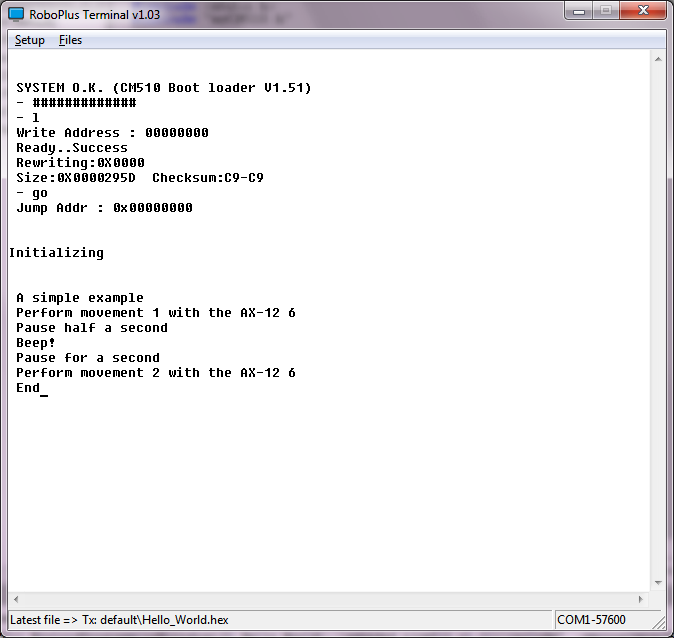
If you have installed the necessary software (WinAVR must be installed in "C:tools WinAVR-20100110") and unzip this zip file in the root directory (C: ) you have to be ready to modify, compile, or simply load the executable "hello_world.hex" in the CM-510. You will see something similar to:

[caption id="attachment_584" align="aligncenter" width="300"]01_Hello_World_CM-510 01_Hello_World_CM-510[/caption]

Some explanations
dxl_write_word (ax12Id, P_GOAL_POSITION_L, 600);

This function is included in the Robotis CM-510 libraries allowing us to send commands to a Dynamixel actuator very easily. We only have to indicate the ID of the AX-12 to move (ax12Id), the code of the order that the AX-12 should execute, in this case go to the goal position (P_GOAL_POSITION_L), and the position in which has to be placed between 0 and 1024 (600 in the example).

dx_series_goal


Highlights:

Decompose the program into different parts

  •     Having previously created the init () function in myCM510.h/myCM510.c allows us to include it easily in this program.

  •     In addition to simplifying programming we can reuse the same code in different programs. This saves us from having to repeat the same code many times and, especially, have to correct faults or improve in only one point, . Later we will see how to organize directories and even how to create libraries.

  •     It also allows us to encapsulate the details, so that when the program starts growing we can handle them easily without being overwhelmed.


Showing what is doing running the program


Using the printf function we can send text to the screen that lets us know what is doing the program (printf sends to the serial port, "RoboPlus Terminal" read it  and displays it on the screen. We will lear how to read from the serial port when we start programming Bioloid using a PC or SBC)

Can you think of an easy way to avoid having two similar functions such as "void executeMovement1 (int ax12Id)" and "void executeMovement2 (int ax12Id)"?

lunes, 5 de marzo de 2012

Linux C++ Dynamixel reading and writing example

If you will like to use some boards like Raspberry or Beagleboard C++ is a great choice. So here you have a working Linux C++ Dynamixel reading and writing example. The main difference is the serial port access:

Here you can download the Eclipse project zipped

Here you can find several combinations of hardware, firmware and programming tools.

The main body


[sourcecode language="cpp"]
#include <iostream>
using namespace std;

#include "SerialPort.h"
#include "Dynamixel.h"

int main() {
cout << "AX Control starts" << endl; // prints AX Control

int error=0;
int idAX12=18;

SerialPort serialPort;
Dynamixel dynamixel;

if (serialPort.connect("//dev//ttyS0")!=0) {
dynamixel.sendTossModeCommand(&serialPort);

int pos=dynamixel.getPosition(&serialPort, idAX12);

if (pos>250 && pos <1023)
dynamixel.setPosition(&serialPort, idAX12, pos-100);
else
printf ("nPosition <%i> under 250 or over 1023n", pos);

serialPort.disconnect();
}
else {
printf ("nCan't open serial port");
error=-1;
}

cout << endl << "AX Control ends" << endl; // prints AX Control
return error;
}
[/sourcecode]

Header


[sourcecode language="cpp"]
#ifndef SERIALPORT_H_
#define SERIALPORT_H_

#include <stdio.h>
#include <termios.h>
#include <fcntl.h>
#include <unistd.h>

class SerialPort {
private:
int fileDescriptor;

public:
int connect ();
int connect (char * device);
void disconnect(void);

int sendArray(unsigned char *buffer, int len);
int getArray (unsigned char *buffer, int len);

int bytesToRead();
void clear();
};

#endif /* SERIALPORT_H_ */
[/sourcecode]

Body:


[sourcecode language="cpp"]
#include <string.h>
#include <sys/ioctl.h>

#include "SerialPort.h"

int SerialPort::connect() {
return connect("//dev//ttyS0");
}

int SerialPort::connect(char *device) {
struct termios terminalAttributes;

/*
* http://linux.die.net/man/2/open
*
* Open the serial port
* read/write
* not become the process's controlling terminal
* When possible, the file is opened in nonblocking mode
*
*/
fileDescriptor = open(device, O_RDWR | O_NOCTTY | O_NDELAY | O_FSYNC );

// clear terminalAttributes data
memset(&terminalAttributes, 0, sizeof(struct termios));

/*    http://linux.die.net/man/3/termios
*
*  control modes: c_cflag flag constants:
*
* 57600 bauds
* 8 bits per word
* Ignore modem control lines.
* Enable receiver.
*/

terminalAttributes.c_cflag = B57600 | CS8 | CLOCAL | CREAD;

/*
* input modes: c_iflag flag constants:
*
* Ignore framing errors and parity errors.
* (XSI) Map NL to CR-NL on output.
*/
terminalAttributes.c_iflag = IGNPAR |  ONLCR;

/*
* output modes: flag constants defined in POSIX.1
*
* Enable implementation-defined output processing.
*/

terminalAttributes.c_oflag = OPOST;

/*
* Canonical and noncanonical mode
*
* min time
* min bytes to read
*/

//terminalAttributes.c_lflag = ICANON;
terminalAttributes.c_cc[VTIME] = 0;
terminalAttributes.c_cc[VMIN] = 1;

/*
* http://linux.die.net/man/3/tcsetattr
* Set the port to our state
*
* the change occurs immediately
*/

tcsetattr(fileDescriptor, TCSANOW, &terminalAttributes);

/*
* http://linux.die.net/man/3/tcflush
*
* flushes data written but not transmitted.
* flushes data received but not read.
*/

tcflush(fileDescriptor, TCOFLUSH);
tcflush(fileDescriptor, TCIFLUSH);

return fileDescriptor;
}

void SerialPort::disconnect(void)
{
close(fileDescriptor);
printf("nPort 1 has been CLOSED and %d is the file descriptionn", fileDescriptor);
}

int SerialPort::sendArray(unsigned char *buffer, int len) {
int n=write(fileDescriptor, buffer, len);
return n;
}

int SerialPort::getArray (unsigned char *buffer, int len)
{
int n1=bytesToRead();
int n=read(fileDescriptor, buffer, len);
return n;
}

void SerialPort::clear()
{
tcflush(fileDescriptor, TCIFLUSH);
tcflush(fileDescriptor, TCOFLUSH);
}

int SerialPort::bytesToRead()
{
int bytes=0;
ioctl(fileDescriptor, FIONREAD, &bytes);

return bytes;
}
[/sourcecode]

martes, 7 de febrero de 2012

Choose hardware, firmware and language

There are a lot of possible combinations of hardware, firmware and languages for programming Bioloid. I think that the table below show the the main combinations.

You can choose from the easy but limited Robotis own tool (Roboplus Task) and only your CM-5 or CM-510 to a SBC or "embedded" PC like Roboard and any language which can manage a serial port connection, like C, C++, Java, Python,...

Linux C++ Dynamixel reading and writing example

C# Dynamixel reading and writing example

Practical C++ programming tutorial for Bioloid

[caption id="attachment_256" align="aligncenter" width="617"]Programming Bioloid: choose hardware, firmware and languages Programming Bioloid: choose hardware, firmware and languages[/caption]

Robotis officially supports the programming solutions with the blue background:

  • The dark blue, RoboPlus Tasks, is the only one in which you can create the motions with RoboPlus Motion and execute it in CM-5/CM-510 with the program create with RoboPlus Tasks, after downloading the generated executable into the CM-5/CM-510, of course.


With these programming solutions you can use the Zigbee SDK to send and receive data between the CM5-/CM-510 and any computer, using Zig-110A or the new bluetooth BT-110, the Zig2Serial and the USB2Dynamixel. You can download example in Visual Basic .Net, C# and Visual C++

But there are more options!

Using a PC, SBC (Single Board Computer), PDA, Mobile or other light and battery powered computer

Using a serial port connection with your more beloved programming language:

  • USB2Dynamixel


If you have any device with a USB host and a FTDI driver you can use USB2Dynamixel to command programatically your Dynamixel servos using the Dynamixel protocol. You only will need your CM-5 or CM-510 to connect your Dynamixel to the battery.

  • Serial port cable


Same as the previous option but instead of using the USB2Dynamixel you only will need the serial cable and the "Toss Mode" launched with the 't' command from the "Manage Mode"


  • Wireless control


Instead of only sending and receiving data, with the previous wireless connections you can command remotely your robot using the standard firmware and the "Toss Mode" launched with the 't' command from the "Manage Mode". You will need to command it using the Dynamixel protocol.

With these options and the CM-510 you will find a little problem... there is no way to read your sensor values! Well, you can use this firmware that offers a "Toss Mode" that supports reading CM-510 ports.

Start learning!

If you want to start learning how to program your CM-5 or CM-510 controller you will find interesting this post "Start programming  CM-5/CM-510 in C". But may be you prefer to control your robot from a PC, SBC or other computer in C++ or C#